
Photoshoot
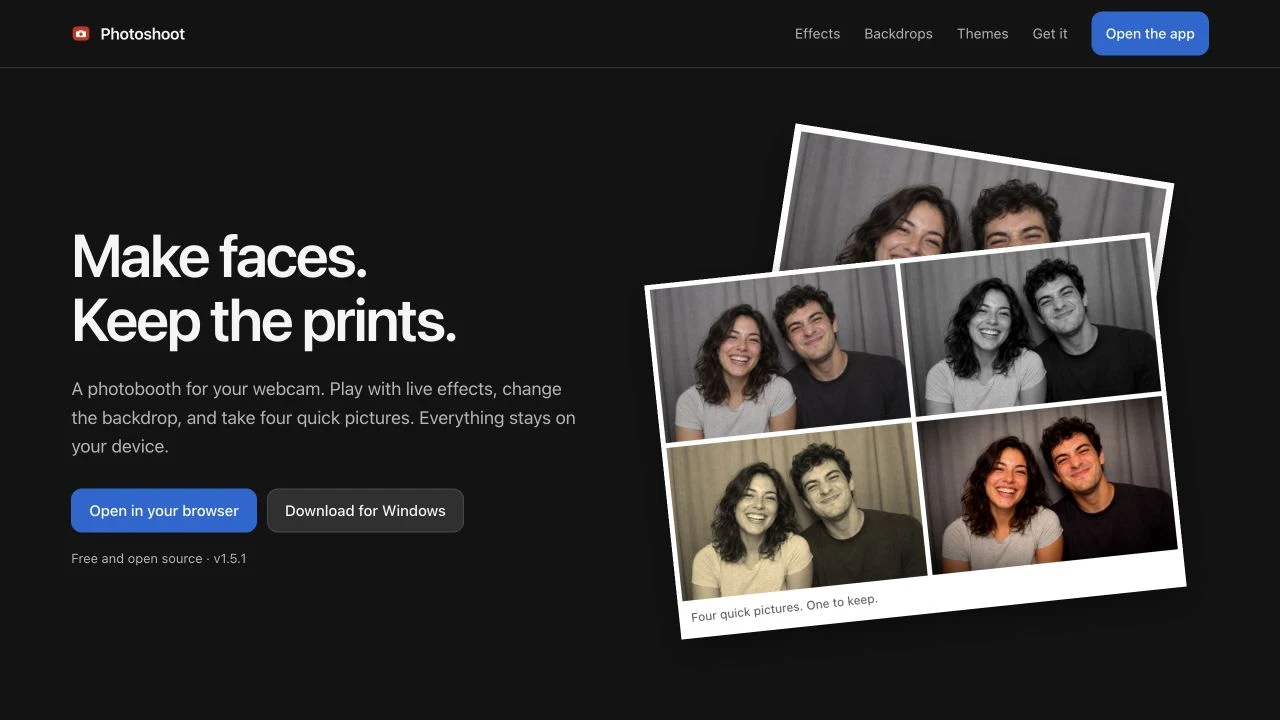
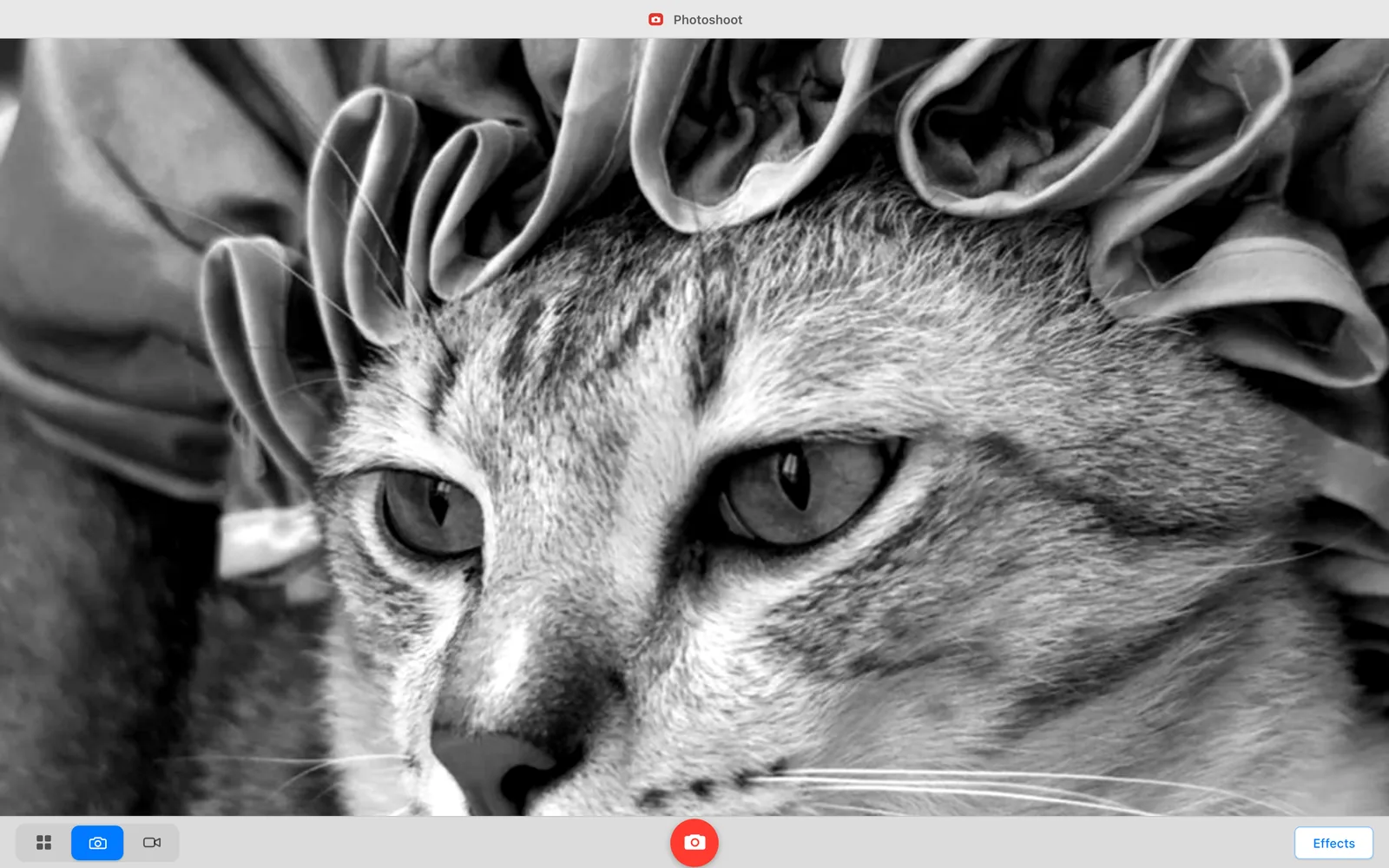
A photobooth with 52 live effects, reactive face masks and prints you can design.
Live site (opens in a new tab)
- Role
- Sole developer: graphics pipeline, security model, both runtimes, deployment
- Dates
- Jun 2026 – present
- Status
- Web app and Windows 1.5.1
- Stack
- TypeScript, Electron, WebGL2, MediaPipe
In short
Live on the web and Windows
One TypeScript renderer runs in the browser and Electron. The browser app is live; Windows 1.5.1 ships as an installer and portable app, with automatic updates for installed copies.
Effects on the GPU
52 effects include 17 face effects, with reactive masks for up to four people. WebGL, tracking and segmentation run on the device; no camera frame is uploaded for processing.
Themes as data
Imported themes and filters can only set whitelisted values, checked twice, so a file from a stranger cannot run code.
One shared renderer, two runtime bridges
-
On the device
- Camera: the user’s own hardware
- Renderer, shared by both runtimes
- Shared: no Node, no DOM
- Bridge: one interface, two implementations
- Electron main
- On-device storage
-
Outside the system
- Third parties
Engineering challenges
-
A theme and filter format that holds only data
An imported filter sets eleven clamped numbers and an imported theme sets whitelisted values; neither can carry code. The theme validator has no tests yet, which is the project’s largest known gap.
-
One compiled shader for every user-supplied filter
Switching filters costs uniform writes, never a shader compile, and the security check for the whole feature is a range check on eleven numbers.
-
The camera worked; the preview was blank
Fixed on 17 June 2026, hardened in the October 1.3.0 release, and covered by CI on Ubuntu and Windows.
-
Replacing the background without a second model
The background is replaced in one pass before the effects run, with one bounded CPU loop and no second model to download.
-
One renderer, two runtimes
34 TypeScript files make one renderer and two runtimes, with the platform difference kept to two files and 486 lines.
Technical decisions
| Decision | What I chose | Instead of |
|---|---|---|
| Lock the renderer down before writing anything into it | Sandboxed renderer, Node off, a strict CSP and local-only media processing | Electron’s defaults, as most desktop wrappers ship |
| A custom app:// origin | The packaged app served from app://photoshoot, a privileged scheme | Loading from file://, or a local HTTP server |
| Hand-written GLSL | Raw WebGL2 effects over one full-screen quad | three.js or PixiJS, or CSS filters and Canvas2D |
| Plain DOM and esbuild | Plain DOM modules and esbuild targets for each runtime | React or Svelte on Vite, with a store library |
| Content-hashed static assets | Hashed file names cached for a year; HTML always revalidated | Query-string cache busting, or a short max-age |
On the web and on Windows
- live effects, excluding Normal
- 52
- on-device face effects
- 17
- faces tracked together
- 4
- effects added in 1.5.1
- 27
Current effect inventory and release notes checked on 26 October 2026. Test results in this case study retain their original dates.
Working with AI tools
Define: Camera preview must reliably render live frames without network media leaks. Decide: Decoupled loop from requestVideoFrameCallback in favour of requestAnimationFrame. Investigate: Agents treated successful getUserMedia resolution as proof of a working preview, overlooking blank Windows GPU viewfinders. Verify: Added integration tests reading raw RGBA canvas pixels to guarantee non-black frames.
Full engineering notes
Summary
Photoshoot turns a webcam into a photobooth with 52 effects, including 17 face effects that can follow up to four people. Version 1.5.1 adds reactive masks, a print editor for four-photo layouts, and automatic updates for the installed Windows app. Camera frames, face tracking, background replacement and captures stay on the device. One TypeScript renderer serves the Electron desktop app and the browser app through a shared bridge for storage and platform features. I built the graphics pipeline, theme and filter import validation, Electron isolation, print tools, landing page and release workflow. The desktop updater downloads software from GitHub; it does not upload camera media.
The problem
A photobooth needs camera access, the most sensitive permission a hobby project can ask for. The constraint was making it playful (warps that follow the pointer, face effects, a printed four-shot strip) without a single frame leaving the machine.
- Effects have to hold display refresh over a live camera stream. CSS filter functions cannot express a pointer-driven warp, and a Canvas2D pixel loop cannot run one at that cadence.
- Face effects need landmark tracking, which is exactly the capability that usually justifies uploading frames to a server.
- The desktop and browser builds have to behave identically, but one has Node, IPC and a filesystem and the other has none of them and never can.
- The app invites community themes and colour filters. A file downloaded from a stranger has to be able to change how the app looks and what the GPU does, without being able to run anything.
My role
What I owned
- The browser and Electron applications: camera acquisition, capture modes, gallery, print editing, settings and release workflow.
- The graphics layer: hand-written GLSL effects, reactive masks for up to four faces, the program cache and WebGL context-loss recovery.
- The security model: Electron window hardening, the app:// scheme handler, filesystem path containment, and the two shared validators that gate every imported theme and filter.
- The shared bridge contract and both of its implementations: the Electron preload over IPC, and the browser shim over IndexedDB, localStorage and a download anchor.
- The app icon, procedural backdrops, synthesized sounds, print layouts and the landing page; the sample photograph is labelled as a fictional scene in its asset provenance.
- The esbuild pipeline, content-hashed web build, Firebase Hosting deployment, automated tests and Windows release workflow.
What I did not own
- MediaPipe Tasks Vision supplies the face-landmark and segmentation models and WASM runtime. These run locally but were not written by me. electron-updater handles the installed Windows app’s update downloads and installation.
- Electron, Chromium, esbuild, electron-builder and Playwright.
- Firebase Hosting, used only as a static file host; firebase.json contains a hosting block and nothing else.
- No design collaborator or QA team. Automated checks and structured agent reviews support development; physical-camera and real OBS coverage remain limited.
Constraints
No cloud media processing
Camera processing and capture storage resolve locally. Static hosting serves the browser build; the desktop app has an optional local OBS bridge and a software updater, but no service that receives a user’s camera frames.
A Content Security Policy with no 'unsafe-inline'
Nothing in the app can inject a style tag or an inline script. That single omission is what forced the theming design: tokens are written through the CSSOM with element.style.setProperty, which is governed by script-src rather than style-src.
Every imported theme is treated as untrusted
Community themes and filters are a feature, so the import path is a permanent, expected attack surface.
One developer, two working days for the first version
The first version was written across 13 commits between 14 and 17 June 2026. That budget is why it shipped with a single test suite, pointed at the validator; the camera and end-to-end suites only arrived in October, after real machines showed where startup failed.
Product flow
getUserMedia opens the camera into a <video> element mounted one pixel wide at opacity 0; pixels flow through WebGL, not through the tag. If the preferred settings are refused, the camera manager retries with basic constraints and times out a stalled request rather than hanging.
requestAnimationFrame ticks at display refresh; prepareFrame() uploads the current video contents into one reusable GL texture.
If a face effect is active, MediaPipe FaceLandmarker (throttled to roughly 22 fps so the render loop keeps its own cadence) supplies iris, nose, mouth, chin, brow and cheek positions as uniforms.
drawEffect() runs the cached fragment program for the selected effect over a single full-screen quad. Nothing is allocated per frame.
grabFrame() re-renders and copies the GL canvas, so the saved file is exactly what the preview showed: effect, mirror and replaced background included.
Single shot saves one image; strip mode composes four onto a warm paper gradient with per-pixel grain and a printed footer; video mode records the canvas stream to WebM.
The capture is written to Pictures/Photoshoot on the desktop, or to IndexedDB in the browser.
Architecture in detail
Photoshoot shares one TypeScript renderer between a browser build and an Electron app. A pure shared layer holds types and import validators. The renderer owns camera capture, WebGL effects, on-device MediaPipe tracking and segmentation, print layout, themes and synthesized sound. PhotoshootBridge provides platform operations: the Electron preload forwards them to the main process, while the browser shim uses IndexedDB, localStorage and downloads. The desktop main process manages local files, window controls, imported themes and filters, the optional loopback OBS feed and software updates from GitHub. MediaPipe models and WASM are served from the app’s own origin. Captures remain local; no camera frame is uploaded to a remote processing service.
| Part | What it holds |
|---|---|
| On the device | |
| Camera: the user’s own hardware |
|
| Renderer, shared by both runtimes |
|
| Shared: no Node, no DOM |
|
| Bridge: one interface, two implementations |
|
| Electron main |
|
| On-device storage |
|
| Outside the system | |
| Third parties |
|
Connections between the parts
- Camera: the user’s own hardware to Renderer, shared by both runtimesgetUserMedia: MediaStream, local only
- Renderer, shared by both runtimes to Shared: no Node, no DOMre-validates every token and parameter before use
- Renderer, shared by both runtimes to Bridge: one interface, two implementationsPhotoshootBridge: typed platform operations
- Bridge: one interface, two implementations to Electron maindesktop: contextBridge over typed IPC channels
- Bridge: one interface, two implementations to On-device storageweb: IndexedDB, localStorage, download anchor
- Electron main to Shared: no Node, no DOMvalidates imports before anything is persisted
- Electron main to On-device storagepath-contained reads and writes
- Renderer, shared by both runtimes to Third partiesloads the face model from app://photoshoot, not a CDN
- Third parties to Renderer, shared by both runtimesFirebase Hosting serves the web bundle; no runtime API calls
- Electron main to Third partiesdesktop software checks and update downloads; no camera upload
How each challenge was solved
A theme and filter format that holds only data
- Why it was hard
Themes change the app’s entire chrome and filters change what the GPU does to every pixel. Both are things a user should be able to download from a stranger and try, and both are the classic route to arbitrary execution. A theme that can set a CSS value can smuggle url(javascript:), @import or a script tag; a filter that can supply shader text can rewrite the pipeline. The desktop app is an Electron process, so a mistake here is not a defaced page; it is a foothold.
- What I built
A theme manifest may set only the 59 whitelisted CSS custom properties: 39 colour, 9 length, 5 shadow, 2 font and 4 texture. Each is matched against a per-kind regular expression, then screened against 24 forbidden substrings including javascript:, expression(, @import, <script, url(, http://, file:, blob:, backslash escapes, braces and semicolons. Texture tokens can never be set from a manifest string at all; they come only from bytes the importer has already verified by magic number. A filter is 11 numbers, each hard-clamped to a fixed minimum, maximum and default, plus an optional lookup table. Every value is validated twice: once by the importer, and again by the renderer immediately before it reaches the CSSOM or a GL uniform.
- Options considered
- Ship only built-in themes and filters, and drop the community format entirely
- Accept CSS text from a manifest and sanitize it on the way in
- Accept GLSL snippets and validate the source before compiling it
- Reduce both formats to whitelisted, typed values with no free text anywhere
- Trade-off
Community themes can only do what the whitelist anticipated. Anything genuinely new needs a new token, a new regular expression and a new release, so the format cannot be extended by the people using it. That is the price of it being data.
- Validation
44 adversarial assertions run over the filter validator: out-of-range values, NaN, Infinity, wrong types, unknown keys, injected strings, junk manifests, and the renderer’s re-clamp of a store that was edited on disk. They run on every push and pull request in CI. The invariant is written into the shader file so it survives the next reader: no part of a manifest ever becomes shader source, JavaScript, CSS or HTML.
One compiled shader for every user-supplied filter
- Why it was hard
Imported filters need to look different from one another: brightness, contrast, temperature, hue rotation, film grain, a colour lookup table. The obvious implementation generates shader source per filter, which puts untrusted data on the path to the GPU compiler and adds a compile stall the first time each one is selected.
- What I built
All imported filters resolve to a single program: the effect id is mapped with `const key = id.startsWith('custom:') ? 'customfilter' : id`, so every custom filter shares one compiled shader. The difference between two filters is three vec4 uniforms and an optional LUT texture. The shader runs brightness, contrast, saturation, temperature, tint, gamma, fade, a hue rotation about the (1,1,1) axis, a 64-level lookup table with blue-channel interpolation, vignette and grain, in that fixed order.
- Options considered
- Generate GLSL per filter from the manifest and compile on first use
- Precompile one program per known filter shape and switch between them
- Compile one fixed program and drive every filter entirely from uniforms
- Trade-off
Every imported filter pays for every stage whether it uses it or not, and a filter can only ever be a point inside that fixed parameter space. Generated shaders would be cheaper per filter and unbounded in what they could express; this trades expressiveness for a surface area of eleven range checks.
- Validation
gamma is clamped to a floor of 0.2 so the shader’s 1/gamma can never divide by zero, and that floor is asserted directly in the suite. A lookup table must be a real 512×512 PNG, checked by magic bytes and by the width and height read out of the IHDR chunk at byte offsets 16 and 20, never by file extension. Non-square images, truncated files, oversized files and a JPEG wearing a .png name are all covered.
The camera worked; the preview was blank
- Why it was hard
The failure users actually saw was a completely black, blank preview viewfinder despite the camera hardware LED being lit and permissions granted. Why an ordinary successful build did not establish that the camera worked: TypeScript compilation, packaging, and even navigator.mediaDevices.getUserMedia resolving were green; the promise resolved and tracks were active. But the camera <video> element was deliberately mounted one pixel wide at opacity 0 because frames flow directly into a WebGL texture rather than through DOM painting. On certain Windows GPU and driver combinations, requestVideoFrameCallback declined to fire for an element in that off-screen state, meaning zero frames ever reached the WebGL texture.
- What I built
How the behaviour was reproduced and corrected: reproduced by testing across windowed and off-screen configurations on Windows with GPU acceleration toggled; the render loop was decoupled from rVFC to always tick on requestAnimationFrame at display refresh, uploading whatever current video frame exists, with a Canvas2D capture fallback when WebGL2 is absent. The reasoning is recorded as an eight-line comment at the scheduling call so the optimisation is not naively reintroduced.
- Options considered
- Mount the video visibly and hide it behind the canvas so rVFC has a painted element
- Keep rVFC and add a watchdog that restarts the loop when no frame arrives
- Drive the loop on requestAnimationFrame and stop depending on rVFC entirely
- Trade-off
On a camera running below display refresh, the same frame is uploaded more than once and that GPU work is redundant. Predictable liveness across hardware was worth more than avoiding repeated uploads.
- Validation
What the regression check now observes: Playwright and Electron integration tests now feed a synthetic video stream and read back raw RGBA pixels directly from the WebGL canvas, failing unless non-black rendered pixels appear. Which checks remain outstanding: physical hardware camera coverage across varied external USB webcams, live verification against a production OBS Studio 28+ install (currently validated against an OBS WebSocket mock), and Windows binary code-signing.
Replacing the background without a second model
- Why it was hard
Background replacement means deciding, per pixel and per frame, what is the person and what is the room. The modern answer is a segmentation model, which would have meant a second on-device model to download and a second inference budget on top of the face mesh. The naive alternative, reading pixels back from the GPU at full resolution and differencing them on the CPU, stalls the pipeline every frame.
- What I built
The user captures a reference frame of the empty scene at 192 px wide. Each frame is differenced against it with a sum-of-channels threshold derived from a user tolerance setting; this is the only CPU pixel loop in the application, deliberately confined to that resolution. The resulting low-resolution alpha mask is upscaled by the GPU during destination-in compositing, which softens the matte edge with no separate feather pass. The composited canvas is then fed back into the GL pipeline as the source, so effects and mirroring still apply on top.
- Options considered
- Add a second MediaPipe model for selfie segmentation
- Difference every frame against a reference at full resolution on the CPU
- Difference against a low-resolution reference and let the compositor do the upscaling
- Trade-off
It asks the user to step out of frame once, and it degrades if the camera or the lighting moves. A segmentation model would need neither. It also means the six backdrops had to be drawable rather than photographable: they are generated procedurally with Canvas2D and cached per size, so no image assets ship.
- Validation
The cost is bounded by construction: the loop is fixed at a 192 px sample regardless of camera resolution, and the upscale is the compositor’s work, not the CPU’s. There is no benchmark in the repository, so I quote no frame rate.
One renderer, two runtimes
- Why it was hard
The desktop app has Node, IPC, a filesystem and a main process. The browser has none of those and cannot be given them. Keeping two builds in step usually degrades one of two ways: a shared core with two thin apps around it that quietly drift apart, or platform checks sprinkled through the renderer that multiply with every feature.
- What I built
The renderer only ever calls PhotoshootBridge, a typed interface declared in src/shared/ipc-contract.ts alongside its IPC channel names. preload.ts implements it over contextBridge and ipcRenderer; src/web/shim.ts implements the same interface over IndexedDB, localStorage and a download anchor. src/shared/ imports neither Node nor the DOM, so it bundles unchanged into the main process, the preload, the renderer and the web shim. The web build bundles src/renderer/main.ts verbatim and only swaps the script tags and sets data-platform="web".
- Options considered
- Two codebases kept in step by hand
- One codebase with `if (isElectron)` branches inside the renderer
- A bridge interface the renderer talks to, implemented once per runtime
- Trade-off
The interface is the lowest common denominator of the two runtimes, so capabilities that only make sense on the desktop (revealing a file in its folder, for example) still have to exist in the browser and do the nearest native equivalent. Adding one feature means touching the contract, both implementations and the preload bridge: four files for one capability.
- Validation
`tsc --noEmit` runs clean with strict mode on, and CI runs it on both Ubuntu and Windows; that is what actually enforces that both implementations satisfy the interface. The camera tests then exercise both runtimes from the same renderer source: one Playwright suite drives the web build in Chromium, and a second launches the packaged Electron app and checks it renders from app://photoshoot.
Why I made each decision
Lock the renderer down before writing anything into it
- Because
The renderer handles a live camera feed and visual data imported from strangers. It is sandboxed with Node integration disabled, context isolation enabled and a strict Content Security Policy. The preload exposes only the typed bridge. Navigation and new windows are guarded, and media is processed locally. Software update traffic belongs to the main process: installer builds can download updates from GitHub and install them on restart; portable builds provide a release-page notice. This network traffic is separate from camera processing.
- Trade-off
Because 'unsafe-inline' is absent, nothing can inject a style tag, so themes had to be applied through the CSSOM instead of by writing CSS. Disabling dev tools in production means a user-reported rendering bug has to be reproduced locally before it can be looked at.
A custom app:// origin
- Because
MediaPipe’s FaceLandmarker fetches its WASM runtime and its model file at startup. Chromium blocks fetch() of file:// resources but allows it for a standard scheme, so a file:// app cannot load an on-device model without reaching for the network, which would defeat the entire point of the product. A real origin also gives 'self' in the CSP something to resolve to. The scheme is registered as standard, secure, supportFetchAPI and stream, and its handler rejects anything resolving outside dist/. The reason is written into the code above the constant, not left in a commit message.
- Trade-off
A scheme handler is code I own and have to keep correct. A path-containment mistake in it would be a file-read primitive, which is why it is one of the places isInside() is applied.
Hand-written GLSL
- Because
The entire app is one quad with a different fragment shader on it. A scene-graph library would have added a dependency, a bundle and an abstraction whose value (meshes, cameras, lighting, material systems) is entirely unused here. CSS filter functions cannot express the seven pointer-driven warps or the face-tracked distortions, and a Canvas2D pixel loop cannot run them at display refresh. Writing the shaders directly is also what made the single fixed custom-filter program possible, which is the thing that makes untrusted filters safe.
- Trade-off
Everything a library would have handled is mine: compilation, linking, VAO setup, uniform plumbing and context loss. Programs are compiled lazily and cached per effect id; webglcontextlost and webglcontextrestored handlers clear and rebuild every program and re-upload every LUT texture; a shader that fails to compile falls back to the pass-through effect once and raises a toast rather than crashing the app. Where WebGL2 is missing entirely, a basic camera mode still takes photos and video without effects.
Plain DOM and esbuild
- Because
The interface is a viewfinder, a control bar, a 3×3 effects grid and a few sheets. Reconciliation buys nothing when the thing changing sixty times a second is a GPU texture. esbuild produces the main, preload and renderer bundles from one script with no plugin system to learn, and type checking is deliberately a separate command: esbuild does none, so a type error can never stop the app from building and running while I am debugging something unrelated.
- Trade-off
There is no component framework, so interface code and shared state need explicit ownership as the app grows. Rendering the camera feed stays separate from updating controls.
Content-hashed static assets
- Because
Every bundle and stylesheet is emitted with an eight-character content hash and Cache-Control: public, max-age=31536000, immutable, while the HTML and the /, /app and /app/ routes revalidate on every load. A push therefore reaches users on their next page load without anyone clearing a cache, and a stale HTML document can never pair with a mismatched bundle, because the document names the exact files it needs. There is no backend to version alongside it.
- Trade-off
Every deploy writes new filenames, so the hosting bucket accumulates the old ones. Deploys are also still a manual `npm run deploy` from my machine; CI builds and tests but does not deploy.
Design evolution
14 June 2026: the app, in one sitting
Ten commits: the Electron and web shell with the landing page and Firebase Hosting config, then the effects registry with drag-to-move distortion centres, print-to-tray capture, the MediaPipe face-mesh effects, the community filter format with lookup tables, a redesigned landing page, and the Darkroom theme.
17 June 2026: the three fixes that only appear once you run it
Nothing on the 15th or 16th; three commits on the 17th, each one a defect that reading the code would not have found. The render loop moved from requestVideoFrameCallback to requestAnimationFrame. The web build started content-hashing its assets so deploys propagate. And a saved camera deviceId stopped being able to permanently break the app.
12 September 2026: clearer entry points
Two documentation pull requests separated the live web app from the desktop source and updated the portfolio links. Windows 1.0.1 downloads were subsequently published on 6 October 2026.
6 October 2026: camera reliability, tests and CI
Camera startup gained relaxed-constraint retries, acquisition timeouts, stale-request cancellation, a usable retry action, basic capture without WebGL2 and graphics-reset recovery. Regression tests now also cover cancelled face-model loads, duplicate inference loops, recording track cleanup and delayed finalization between recordings.
26 October 2026: 1.5.1 released
27 new effects bring the total to 52. Reactive masks follow up to four people, four-photo prints gain captions and layout controls, and installed Windows copies can download future updates and install them on restart. The portable app retains update notices. Camera media stays local.
Testing
Verification records are dated: the 19 October release note reports 339 unit checks, 44 filter/camera/lifecycle assertions, 6 real-model background checks and 58 browser/Electron tests passing before 1.3.0. The 26 October source adds regressions for face placement, shader compilation, print layouts, review and short-window controls. Those newer suites were not rerun for this portfolio update.
- Filter-validator assertions
- 44
- Camera unit tests
- 8
- Face-tracking and recording lifecycle tests
- 13
- Playwright end-to-end tests
- 9
- CI jobs on every push to main and pull request
- 2
Representative cases
Filter numeric clamping across all eleven parameters: values below the minimum, above the maximum, NaN, Infinity, and the wrong type entirely.
Filter manifest hygiene: unknown keys dropped, injected strings sanitized, and a junk manifest rejected outright rather than partially applied.
Lookup-table filename traversal and bytes: ../../etc/passwd, absolute paths, backslashes, dotfiles, control characters, PNG magic numbers, a 512×512 IHDR, non-square images, a JPEG wearing a .png name, truncated and oversized files.
Tamper recovery: the renderer’s clampParams re-clamps a filter store that was edited on disk after import, which is the second half of the validate-twice rule.
Camera manager: retrying basic video when constraints are refused, keeping the chosen device while relaxing constraints, asking for permission only once after a denial, releasing a stream whose playback fails, discarding an obsolete request, and timing out a stalled acquisition.
Lifecycle races: closing an effect while its model loads cannot start late inference; repeated activation creates one loop. Recording failures release canvas tracks, and a delayed stop event cannot mix chunks or metadata with the next recording.
Browser end to end: a photo saved to the gallery from real pixels, capture without WebGL2, a recovery action for blocked playback, fallback from unavailable settings, and graphics-context resets during preview, recording and countdown.
Desktop end to end: the Electron app opens at app://photoshoot, acquires the synthetic camera and renders non-black pixels, on Ubuntu and on Windows.
Current authored coverage also includes the theme validator, path safety, print geometry, OBS integration against a local mock server, shader compilation and face placement. Real OBS on Windows and broad physical-camera coverage remain unverified; automated camera checks use synthetic video.
Results in detail
1.5.1: effects that react to everyone in the picture
27 new effects bring the total to 52, including 17 face effects. Puppy, Kitty and other masks respond to expressions and follow up to four people. The release also corrects face-effect placement and mirroring. Tracking and rendering stay on the device.
Design the print after taking the photos
Four-photo captures can become a grid, strip, row or featured-photo layout. Add a caption and date, choose from five fonts and five paper colours, adjust alignment, size and ink, and turn the small Photoshoot mark off. Each shot can use a different effect.
Windows installer and portable app released
Windows 1.5.1 ships as an installer and a portable executable with SHA-256 checksums. From this version, installed copies can download future updates in the background and install them on restart; portable copies show an update notice. Automatic installation can be turned off. Packages are unsigned, and there is no macOS release.
Backgrounds and a local virtual camera
On-device person segmentation supports blurred, studio, room and custom backdrops. The Windows app can feed OBS Studio’s virtual camera over loopback. That path is tested against a mock WebSocket server; a real OBS installation on Windows remains a separate verification step.
Two runtime dependencies
MediaPipe Tasks Vision supplies local vision models and electron-updater supplies desktop update handling. The effects, print geometry, import validation and synthesized sounds are application code. The app does not upload captures for processing.
Reflection
What worked
- Validating twice, once at import and again at use, cost almost nothing and meant the renderer never has to assume the importer ran, or ran the current version of itself.
- Splitting the texture upload from the draw call was a small refactor that made the effects menu possible at all: it uploads one frame and draws several different effects from it, three tiles per animation frame through a second small renderer capped at 420 px.
- Testing the outcome rather than the call. The browser and Electron specs read pixels back off the canvas instead of checking that getUserMedia resolved, which is the only assertion that would have caught the original blank-preview bug.
What I underestimated
- Platform behaviour that is technically correct and practically useless. requestVideoFrameCallback declining to fire for an off-screen video is legal, and it presents to the user as "the camera is broken".
- How many ways a camera can fail to start. A stale saved deviceId, refused constraints, a request that never resolves, playback blocked after the stream opened, and a GPU reset mid-capture each needed their own handling, and most only showed up on someone else’s machine.
- How easily documentation drifts from the actual render loop, theme inventory and release state. Live bundle hashes, dated test results and an explicit desktop release status make those claims easier to recheck.
What I would do next
- Sign the Windows release and broaden physical-camera testing. Version 1.5.1 already has public installer and portable downloads; code signing remains a separate delivery step.
- Verify the virtual-camera path with a real OBS installation on Windows, beyond the existing local WebSocket test server.
Stack and release record
Platforms
Web (WebGL2 browsers, with a basic capture mode where WebGL2 is missing), Desktop (Electron): Windows 1.5.1 installer and portable app released
Built with
TypeScript 5.6 (strict), Electron 44, WebGL2 · GLSL ES 3.00, MediaPipe Tasks Vision (FaceLandmarker), esbuild, Web Audio API, Canvas2D · MediaRecorder, IndexedDB · localStorage, Playwright · node:test, GitHub Actions, Firebase Hosting, MediaPipe selfie segmentation
Testing and delivery
Windows 1.5.1 was released on 26 October 2026 with installer, portable app and checksums; the product site also identifies 1.5.1. The 19 October verification record remains historical: it records 339 unit checks, 44 filter/camera/lifecycle assertions, 6 real-model background checks and 58 browser/Electron tests. Newer face, print and update code has authored tests, but no fresh test total is claimed here.
Status in full
The browser app is live. Windows version 1.5.1 was released on 26 October 2026 as an installer and a portable app. It adds 27 effects, reactive masks for up to four faces, custom prints and automatic updates for installer users. The portable app provides update notices instead. Windows packages are unsigned; there is no macOS release.
More work
- BupplesShared expenses, receipt review and settlement plans, backed by a multi-currency ledger.
- WayClubGroup management for teams, clubs and communities, from meetings to handover.
- AdelanteDaily-quote widgets for iPhone and Apple Watch, with one rotation rule in Dart, Swift and Kotlin.
- CodeAtlasFinds the tests that reach a code change, runs both revisions and signs the evidence.
- PlanketA shared calendar that shows when everyone is free and sends a plan in three taps.
- CareerOSNotices when you ship, and drafts résumé and LinkedIn lines from evidence it can cite.
- HACKFAMTeammate matching for hackathons, CTFs and game jams, event by event.


