Adelante
Daily-quote widgets for iPhone and Apple Watch, with one rotation rule in Dart, Swift and Kotlin.
App Store (opens in a new tab)
- Role
- Sole developer: the Flutter app, the native widget, Watch and Messages code, the content pipeline, the backend and the App Store release
- Dates
- Jun 2026 – present
- Status
- App Store since Oct 2026
- Stack
- Flutter, SwiftUI, Kotlin · 566 tests passing
In short
Native widgets
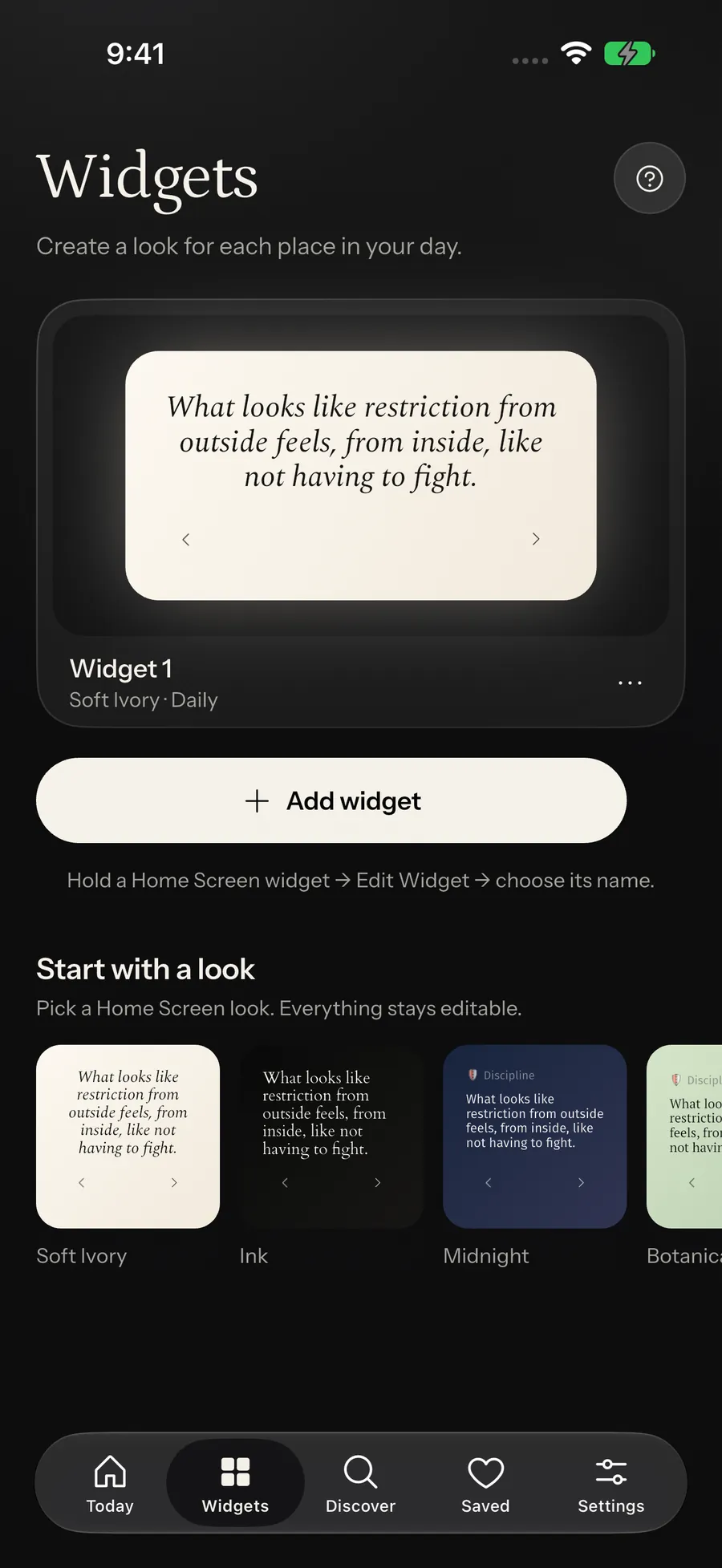
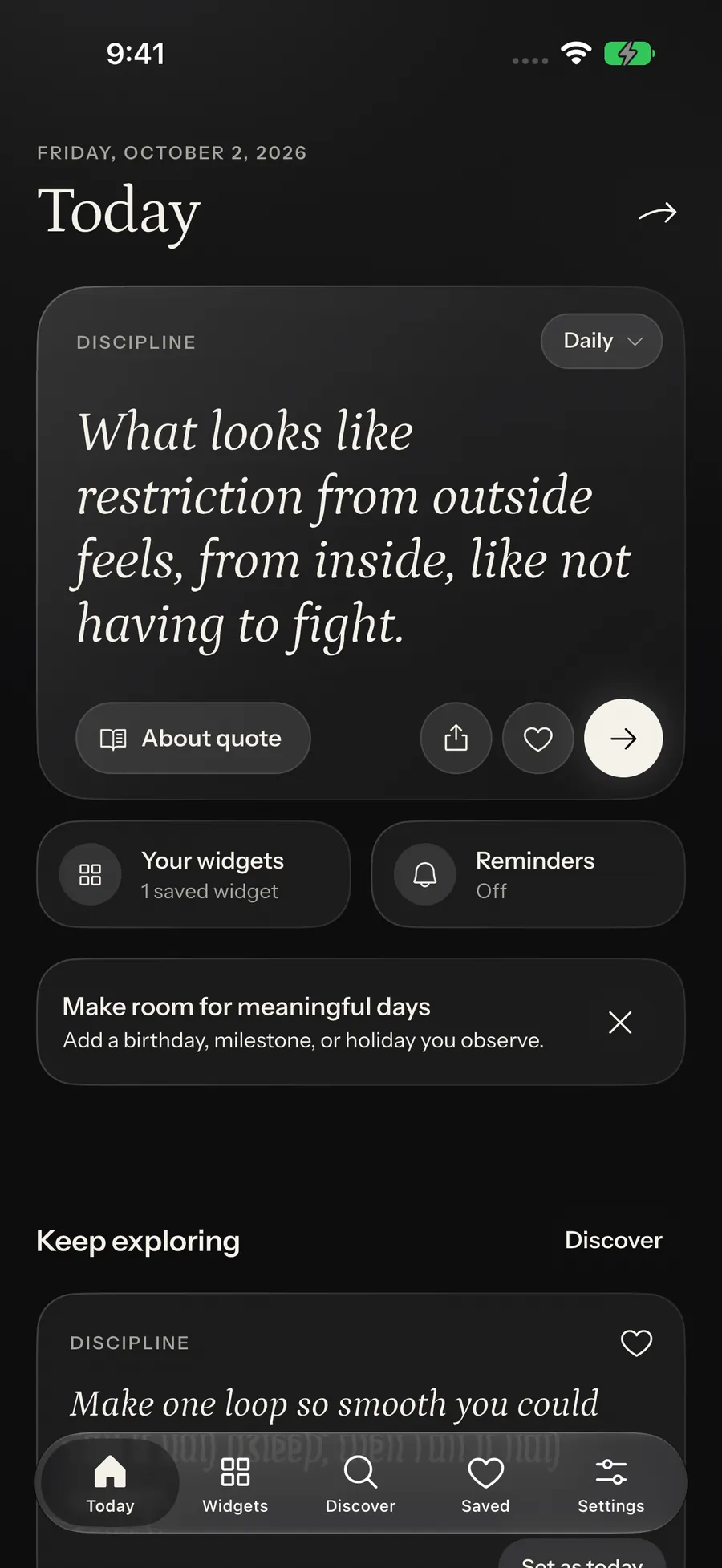
I built the Flutter app, the SwiftUI widgets, an Apple Watch reader, a Messages extension and a Kotlin widget renderer. Seven iOS widget families share one set of views.
One quote everywhere
The app, the widgets and the Watch are separate processes. Each works out the current quote from one shared rotation rule, so they agree without messaging each other.
A library that ships offline
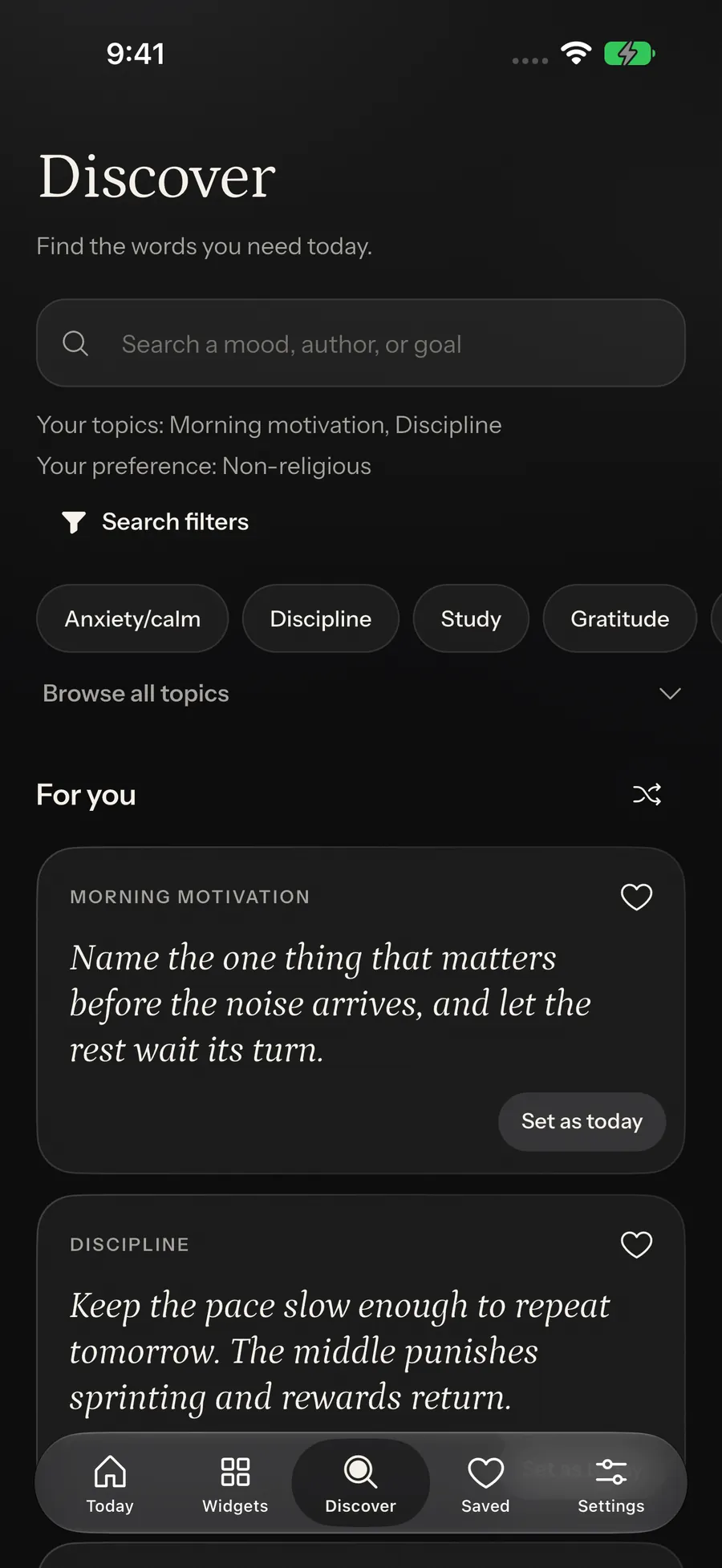
12,759 entries across 20 categories ship inside the app, checked by a deterministic gate for duplicates, filler and missing citations.
Every widget works offline
-
On the device
- Flutter app
- Shared local store
- iOS widget extension
- Apple Watch and Messages
- Android widget
-
On my infrastructure
- Firebase (adelante-yeegz)
-
Outside the system
- Build-time tooling on my machine
Engineering challenges
-
Several renderers agreeing on the current quote without talking
Every surface derives the same quote from one rotation function in Dart, Swift and Kotlin. An earlier version gave each renderer its own cursor and drifted, so I removed it before rebuilding rotation this way.
-
Long quotes never landing on a surface that cannot hold them
Quotes are never cut. Each surface only picks entries short enough for it, and that rule is written once, in Dart, where the tests are.
-
User-chosen typefaces on widget systems that refuse them
A typeface chosen once applies on the Home Screen, the Lock Screen and the Watch. The Xcode target changes are scripts, so a regenerated project keeps them.
-
Making RemoteViews look like the SwiftUI widget
Both widgets render the same gradient, corner radius and type from one payload. The Android test checks the layout source, which catches a removed attribute but not every rendering change.
-
A deterministic gate over machine-generated content
12,759 entries across 20 categories ship with no duplicate text, and every scripture verse carries a citation. The gate rejects the same things the same way on every run.
Technical decisions
| Decision | What I chose | Instead of |
|---|---|---|
| Ship the whole library; treat the backend as growth | An 11.8 MB library inside the app, with Firebase sync for corrections | Fetching the library on first run and caching it |
| Sync is off unless an endpoint is compiled in | An endpoint compiled in at build time, empty by default | A runtime feature flag, or a hardcoded endpoint |
| The library as a JSON asset | library.json loaded at boot, with the compiled seed as a fallback | Keeping the content as compiled Dart, which is what the seed file used to be |
| No accounts or ads; usage counts only by opt-in | No auth, ads or tracking SDKs, and usage counts off by default | An account layer, or a third-party analytics SDK |
| Firebase for the content backend | Firestore, Cloud Functions on Node 22 and App Check | Supabase and Postgres |
On the App Store since 4 October
- entries in the bundled library
- 12,759
- iOS widget families
- 7
- Dart test declarations
- 478
- bundles in one App Store release
- 5
Counted from the source and the release build on 12 October 2026.
Working with AI tools
An agent design pass gave every panel a glossy sheen and the buttons a gradient glow. I had both removed the same day: Adelante’s surfaces are meant to be calm and flat. I also reverted an agent-built native glass tab bar that rendered flat inside Flutter.
Full engineering notes
Summary
Adelante puts daily quotes on surfaces the device already shows: Home Screen, Lock Screen and StandBy widgets, an Apple Watch reader with Smart Stack complications, and a Messages sticker extension. It has been live on the App Store since 4 October 2026. I built the Flutter app, the native renderers (WidgetKit and SwiftUI on iOS and watchOS, RemoteViews on Android), the deterministic pipeline behind a 12,759-entry library that ships inside the binary, and the Firebase backend that now serves content updates behind App Check. The difficult part was getting several processes that never talk to each other to agree, offline, on what to show now.
The problem
The content has to arrive without being asked for, on a surface the user already looks at, across widget systems that agree on almost nothing.
- A widget is not a screen you own. WidgetKit decides when a widget wakes and how much refresh budget it gets, and the app may not be opened for days, so the widget has to advance on the user’s chosen cadence without being told to.
- It also has to be right when the app is opened. The Flutter app, the iOS widget extension, the Watch app and the Android provider are separate processes with no shared clock, and all of them have to name the same current quote.
- The native widget systems are not comparable. SwiftUI will draw whatever it is handed; RemoteViews cannot paint a gradient, cannot round a corner arbitrarily, and cannot set a typeface at runtime at all.
- No accounts, no advertising and no tracking was written as a product non-goal before implementation, which rules out the ordinary content-delivery shape where a server knows who asked for what. When usage counts were added later they had to be opt-in, anonymous and allowlisted.
- Content at the volume a rotating widget needs cannot be hand-written. Generating roughly 13,000 candidate lines across 141 batch files makes near-duplicates, filler phrasing, missing licences, invented scripture citations and quietly unoriginal “originals” a standing risk.
- Faith is part of the content. A user who selects one tradition must never be shown another, which is the kind of promise a scoring function quietly breaks.
My role
What I owned
- The Flutter application: 26,604 lines across 82 Dart files, covering the Riverpod 3 provider graph, the content repository and search index, the recommendation engine and refresh policy, onboarding, the widget studio, the share editor, reminders, backups, iPad layouts and settings.
- The iOS widget extension end to end: the WidgetKit bundle and its seven families, per-widget saved designs through App Intents on iOS 17+, the SwiftUI views, the shared payload decoder and rotation, App Group entitlements, and the Xcode targets themselves, created and kept reproducible by Ruby scripts driving `xcodeproj`.
- The Apple Watch app, its Smart Stack complications and the Messages sticker extension: 1,797 lines of Swift across those three targets, fed from the phone through WatchConnectivity and the shared App Group.
- The Android widget: a RemoteViews AppWidgetProvider that draws the quote block and the gradient background to bitmaps with the bundled fonts, plus a configure activity so each placed widget can use a different saved design.
- The content pipeline: a 471-line deterministic gate (three dedup layers, quality filters, licence and citation enforcement, stable ids), the 12,759-entry library it produces, and a quarantine file for records pulled after review.
- The backend: eight Cloud Functions in TypeScript (content sync, scheduled import, editorial callables, opt-in usage collection and its report), Firestore rules and indexes, and App Check enforcement, deployed to the adelante-yeegz project.
- The test suite and the release: 478 Dart test declarations across 77 files, 105 backend test declarations, Watch XCTest suites, and the TestFlight builds that ended in the App Store release.
What I did not own
- The typefaces and icons. Petrona, Spectral, Cardo, PT Serif, Fira Sans, Instrument Sans and Instrument Serif are bundled under the SIL Open Font License; the Phosphor icon font is MIT. Each licence ships inside the app.
- The scripture translations. The public-domain sources (King James Version, Pickthall, JPS 1917, Max Müller, Edwin Arnold) are cited, not written.
- The prose, mostly. 12,663 of the 12,759 entries are generator output run through the gate; the other 96 are the curated seed, 72 public-domain lines and 24 written by hand. The curated entries are registered as authoritative so generated output can never displace them.
Constraints
No accounts, advertising or tracking
Written as a non-goal in the design spec before implementation, so no auth layer, attribution SDK or ad network could be added later for convenience. The manifest shows it: the app has 15 direct runtime dependencies and none is an analytics, auth, attribution, crash-reporting or advertising package. The one exception to “nothing leaves the device” is first-party usage counting, which is off until the person turns on “Help improve Adelante” in Settings, sends allowlisted event names with no installation or user identifier, and is declared in the privacy manifest as Product Interaction for analytics, not linked to identity and not used for tracking.
The widget must work with nothing but the local store
Neither native widget provider is allowed to reach the network. Both read only the shared local container (the App Group UserDefaults suite on iOS, SharedPreferences on Android), so everything a widget needs has to be serialised into the payload before it is written, including the length tier and the rotation anchor.
RemoteViews describes a view to another process
No gradients, no arbitrary corner radius, no runtime typeface, and a payload that crosses a process boundary with a hard size limit, so anything drawn on the app side has to be small enough to survive the trip.
Fonts do not cross extension boundaries
A widget extension, a Watch app and a Messages extension are each their own bundle. Fonts registered by the host app are invisible to them, and `Font.custom` with a family name fails silently: it falls back to system with no error and no crash, so the failure only shows up as a surface that looks wrong.
Ship without depending on the backend
The delivery decision was hybrid: the full library ships as a bundled asset and Firebase sync is only for corrections and new content. The App Store build compiles the endpoints in, but a build with none configured still has to run, and the first frame never waits on the network.
Product flow
Boot loads assets/content/library.json into QuoteRepository, which builds an inverted search index as it constructs.
ContentFilter narrows the library by selected categories and religious preference, a hard predicate applied before anything is scored.
RecommendationEngine ranks what survives; QuoteRefreshPolicy decides which entry is current.
WidgetPayload serialises a styled pool: each entry carries its full text and a length tier stamped from it, and the app’s current quote is forced to index 0.
home_widget writes the payload into the App Group container on iOS and SharedPreferences on Android; a bounded copy of the eligible pool goes to the Watch through WatchConnectivity.
Each native renderer reads its store, filters the pool down to the tiers its family can hold, and computes the rotation index from the shared anchor. No message passes between the processes to agree on it.
Architecture in detail
Adelante runs as several independent processes on one device. The Flutter app holds the content repository, search index, recommendation engine and refresh policy, and writes a single serialised payload into a shared local store (an App Group container on iOS, SharedPreferences on Android) using the home_widget package. That shared store also holds the bundled 12,759-entry library.json asset, cached content and preferences. Native renderers read the shared store and never open a socket: an iOS WidgetKit extension with seven widget families, per-widget saved designs through App Intents, SwiftUI views, a payload decoder, a copy of the rotation function and a precomputed twelve-entry timeline; and an Android AppWidgetProvider that draws the quote block and gradient background to bitmaps with its own copy of the same rotation function. The phone sends a bounded quote pool to an Apple Watch app with Smart Stack complications through WatchConnectivity, and a Messages sticker extension reads the same App Group. A build-time toolchain on the developer machine generates library.json through the deterministic gate and automates the Xcode widget, Watch and Messages targets. A Firebase project, adelante-yeegz, holds eight deployed Cloud Functions: getContent for delta sync, scheduledContentImport on a 24-hour schedule, approveContent, rejectContent, getEditorialContent and updateContent as operator callables, collectAnalytics for opt-in usage counts and getAnalyticsReport, over Firestore with rules that deny all client writes. The app calls getContent with an App Check token and no user identifier, and sends usage counts only after the person opts in.
| Part | What it holds |
|---|---|
| On the device | |
| Flutter app |
|
| Shared local store |
|
| iOS widget extension |
|
| Apple Watch and Messages |
|
| Android widget |
|
| On my infrastructure | |
| Firebase (adelante-yeegz) |
|
| Outside the system | |
| Build-time tooling on my machine |
|
Connections between the parts
- Build-time tooling on my machine to Flutter appgenerates library.json into the app bundle
- Build-time tooling on my machine to iOS widget extensioncreates and repairs the extension targets and their font resources
- Flutter app to Shared local storewrites one serialised payload via home_widget
- Shared local store to iOS widget extensionread-only; the extension never opens a socket
- Shared local store to Android widgetread-only; the provider never opens a socket
- Flutter app to Apple Watch and Messagesbounded quote pool via WatchConnectivity; Messages reads the App Group
- Flutter app to Firebase (adelante-yeegz)GET ?since=<version> with an App Check token; usage counts only after opt-in
How each challenge was solved
Several renderers agreeing on the current quote without talking
- Why it was hard
The Flutter app, the WidgetKit extension and the Android RemoteViews provider are separate processes with no channel between them. WidgetKit decides when a widget wakes and rations the refresh budget, and the app may go unopened for days, so the widget has to advance on the user’s cadence without being told to and still be showing the same entry the app shows the moment it is opened.
- What I built
One pure function of (anchor timestamp, interval, pool length), written three times: in Dart for the app, in Swift for the iOS widget and in Kotlin for the Android provider. Every publish forces the app’s current quote to pool index 0, so an in-app refresh snaps every surface back into alignment. iOS additionally precomputes up to twelve future timeline entries so WidgetKit can rotate on schedule inside its budget instead of waking for each change.
- Options considered
- Push a fresh payload from the app on every rotation
- Let each renderer keep its own cursor and rotate independently
- Derive the index from shared constants so nobody has to be told anything
- Trade-off
The same arithmetic lives in three languages, and nothing but tests keeps the copies honest. The Lock Screen’s separate-surface offset is also a hardcoded 7: the tests pin that lock differs from home, not that the value is 7.
- Validation
test/widget_parity_test.dart (18 declarations) and test/widget_text_and_payload_test.dart (12) assert the shared contract, and the parity suite reads the native sources off disk so a change to the Swift or Kotlin copy fails a Dart test.
Long quotes never landing on a surface that cannot hold them
- Why it was hard
Before the overhaul the iOS medium, large and extra-large families all rendered the full text, so a long entry either overflowed its tile or shrank until it was unreadable, recorded as a baseline defect in the overhaul spec before any of it was touched. Fixing it where it showed up would have meant the same rules written in Dart, Swift and Kotlin, each free to disagree. And for an attributed quotation, cutting the text is not a neutral layout choice: it changes what the author said.
- What I built
The first version truncated once in Dart, to 88 characters for small and 260 for large, preferring a sentence boundary. The shipped version stops cutting altogether: WidgetText.forQuote now passes the complete text into every slot, with the rule written beside it that layout may shrink the type but must never substitute a rewrite. What keeps long quotes off small surfaces is eligibility. The payload serialiser stamps a tier on the full text (0 at 90 characters or fewer, 1 at 170 or fewer, 2 above), and each native surface filters the pool by tier before it picks: large and extra-large take anything, medium takes up to tier 1, and small plus every Lock Screen accessory take tier 0, while Android does the same from the widget’s measured width in dp.
- Options considered
- Shrink the text until it fits
- Truncate inside each native renderer
- Truncate once in Dart
- Never cut; make long entries ineligible for small surfaces
- Trade-off
A user whose library skews long sees a smaller effective pool on the small family than on the large one, and the type on a large widget can get small before a long entry fits.
- Validation
test/widget_text_and_payload_test.dart (12 declarations) pins the tiers and the payload shape; test/widget_parity_test.dart (18) asserts the tier gate is still present in both native sources.
User-chosen typefaces on widget systems that refuse them
- Why it was hard
Two unrelated platform walls. On iOS every extension is its own bundle, so fonts registered by the host app are invisible to it, and Font.custom with a family name fails silently: system fallback, no error, no crash, just a widget that looks wrong. On Android, RemoteViews cannot set a typeface at runtime at all.
- What I built
On iOS the families were added to the extension target’s own resource phase and declared in its own UIAppFonts, then resolved by exact PostScript name, with the silent-fallback failure mode written into the comment beside them; the Watch app, its widget extension and the Messages extension each bundle their own copies. The Xcode mutations are automated in Ruby against xcodeproj so the project can be regenerated and rebuilt. Android went through both options: first five baked layout variants selected by a token from the payload, then a renderer that loads the font with ResourcesCompat.getFont and draws the whole quote block, attribution included, into a bitmap, which made the variants unnecessary.
- Options considered
- Ship one system typeface on both platforms and drop the choice
- iOS: add the fonts to each extension target and resolve by exact PostScript name
- Android: bake one layout variant per typeface and select it from the payload
- Android: draw the text yourself with the font resource
- Trade-off
On Android the quote is now an image, so its accessibility depends on a content description set beside it rather than on real text. The four variant layouts are still in the tree, unreferenced. On iOS the path depends on PostScript names no compiler checks: rename a font file and the widget silently falls back to system.
- Validation
The release IPA carries five bundles (app, widget extension, Watch app, Watch widgets, Messages) and passed App Store Connect validation; the widget .ttf files are declared in two places that have to agree, pubspec.yaml’s fonts block and the extension’s Info.plist.
Making RemoteViews look like the SwiftUI widget
- Why it was hard
RemoteViews describes a view to another process rather than drawing one. It cannot paint a gradient, cannot round a corner to an arbitrary radius, and host TextView metrics move attribution away from the quote in ways the app cannot control. The payload also crosses a process boundary with a hard size limit.
- What I built
The background is drawn to a Bitmap on a Canvas sized to the widget’s actual aspect ratio, so the corner radius still reads as circular after scaling, and capped at 480 px on the longest edge. The quote, header and attribution are laid out together with the chosen font and drawn into a second bitmap capped at 720 px, so spacing matches the preview and the iOS widget. The earlier XML path, which relied on uniform auto-size text, was retired; padding, alignment, corner radius and metadata visibility are still driven from the same payload the iOS side reads.
- Options considered
- Accept a flat, solid Android widget that does not match iOS
- Lay out text in XML and rely on the host’s auto-size
- Render background and quote block to bitmaps sized to the widget’s real aspect ratio
- Trade-off
Both bitmaps are regenerated on every update and cost memory in proportion to the widget’s on-screen size, and the caps trade sharpness on the largest widgets for staying under the transaction limit.
- Validation
test/android_widget_remote_views_test.dart reads android/app/src/main/res/layout/adelante_widget.xml off disk and asserts the layout uses only RemoteViews-supported tags, and that the quote ImageView keeps fitCenter scaling, is exposed to accessibility and carries no text size or margin.
A deterministic gate over machine-generated content
- Why it was hard
Reaching a floor of 500 entries per category meant producing roughly 13,000 candidates across 141 batch files. Judgement can live in the generator, but enforcement cannot: near-duplicates, filler phrasing, missing licences and invented scripture citations have to be rejected the same way every time, and provably, or the library quietly fills with paraphrases of itself.
- What I built
tool/generate_library/gate.dart, 471 lines, with three independent dedup layers: exact normalised text, an order- and punctuation-insensitive token-set fingerprint, and a stopword-stripped content key that catches “Discipline is the bridge between goals and results” against “Discipline is a bridge from goals to results”. Quality filters are a 12 to 320 character band, a sentence-shape check, 15 exact bare clichés and 19 substrings that read as machine filler. Licence enforcement rejects invalid licence values and anything typed as scripture without a citation. Ids are FNV-1a derived and stable, and there are nine typed rejection reasons. The 96 curated entries are registered first and prime the dedup sets, so generated output cannot re-introduce a curated line. Server-side, functions/src/model.ts applies a strict record validator and a matching fingerprint, and the importer only fetches from allowlisted hosts; every imported record still needs operator review before it is published.
- Options considered
- Read and approve every candidate by hand
- Score candidates and accept everything above a threshold
- Enforce with a pure, deterministic function and keep judgement upstream in the generators
- Trade-off
A deterministic gate rejects safely and reads badly: it cannot tell a dull line from a good one, or an “original” from a familiar line someone else published first, so it removes only the failure modes it can name. A later content audit had to quarantine 69 records the gate had passed, for repeated templates, unsupported claims and two lines that were not original at all.
- Validation
The shipped asset holds 12,759 entries with 12,759 unique ids and 12,759 unique texts, verified by loading library.json and counting. test/content_foundation_test.dart (21 declarations), test/content_library_test.dart (9), test/content_asset_floor_test.dart (7) and test/content_provenance_audit_test.dart (8) hold the floors, the shape and the false-original quarantine against the shipped asset itself.
Why I made each decision
Ship the whole library; treat the backend as growth
- Because
The delivery decision was written as hybrid before it was built: ship the full generated library as an offline asset and keep getContent delta sync for corrections, withdrawals and new content. A widget product whose first frame depends on a network call has a bad first frame.
- Trade-off
The asset is bundled uncompressed and decoded with jsonDecode at boot. The design spec called for a gzipped library.json.gz; the shipped asset is plain JSON, and the cold-start cost of parsing it has not been measured.
Sync is off unless an endpoint is compiled in
- Because
An empty endpoint means sync is disabled and the app stays purely local, so a build with no backend configured still ships and runs. The release build supplies the endpoints from a define file, which keeps project ids and keys out of the source tree.
- Trade-off
Configuration became part of the release: the App Store build is only as connected as the define file it was built with, so the release preflight has to reject placeholder or non-HTTPS endpoints and debug App Check settings. The endpoint now rejects requests without a valid App Check token, and real-device App Attest has not yet been verified end to end on a physical iPhone and Watch.
The library as a JSON asset
- Because
Written at the loader: this is what lets the library grow to thousands of entries without ballooning the compiled binary or the parse time of a giant source file. Any load or parse failure falls back to the compiled seedMotivationQuotes, so the app is never contentless.
- Trade-off
Two representations of the content now have to stay compatible, and the fallback path is the one least likely to be exercised. The related “no local database” decision was written with a note to revisit past roughly 10,000 entries; the library is 12,759 and it was not revisited.
No accounts or ads; usage counts only by opt-in
- Because
No accounts and no tracking was written as a product non-goal before implementation, so it shaped the architecture from the start. When usage counts were added for the release they followed the same rule: an explicit Settings switch, allowlisted event names kept identical on client and server, a fresh random id per event used only to de-duplicate retries, and no installation or user identifier. The only authentication anywhere in the system is a server-side admin claim that gates the operator, not users.
- Trade-off
Nothing syncs between devices: a reinstall loses favourites, presets and widget designs unless the person exported a backup. There is still no crash reporting, so a field failure is invisible unless someone reports it. And quote-level events carry a quote id, which can reveal a subject, which is why they sit behind the opt-in.
Firebase for the content backend
- Because
The comparison I wrote before building it favoured mobile SDKs, offline persistence, security rules, scheduled functions, and a console-based admin path that meant the curation workflow did not need a custom API and review UI built first.
- Trade-off
The shipped client never uses the Firestore SDK: it calls HTTPS functions, which use the Admin SDK and bypass rules entirely, as the rules file’s own header states. Most of what won the comparison is unused by the path the app actually takes; App Check is the part that earned its place.
Design evolution
The baseline was written down before it was fixed
The overhaul spec opens with a “Baseline facts (from codebase audit)” section naming the defects in my own code: every iOS family rendered full text regardless of size, and search was a substring scan over a recomputed 13-field blob with no index, ranking, debounce or diacritic folding, caged inside the user’s selected categories so nothing outside them was discoverable.
Rotation was deleted before it was rebuilt
Independent per-renderer rotation shipped first and drifted. I removed it outright rather than patching it, and the shared deterministic index arrived a month later as its replacement.
Search became an index
lib/features/content/data/search_index.dart maps token to quote id to accumulated field weight (text 3.0, author 2.0, category 1.5, tag 1.0, mood and tone 0.75) with AND semantics across tokens and the last, still-being-typed token prefix-matched so live typing works without a trie. Search now follows the saved topic and faith preferences by default and offers explicitly labelled broader scopes, and never searches outside them silently.
The library grew, then an audit pruned it
96 curated seed entries, then 10,047, then 12,828 once the faith categories were filled. A content audit in September then corrected six attributed short forms that had reworded their sources, and quarantined 69 records with a written reason each: 42 repeats of one template across unrelated categories, health and money claims that needed factual review, and two “originals” that turned out to be published wording from elsewhere. The library ships at 12,759.
The tab bar was reverted twice before it was native
A Flutter approximation of the iOS 26 Liquid Glass tab bar was built and reverted twice on 21 June 2026, because a native UIVisualEffect renders flat inside Flutter. It was finally solved by registering a real UITabBar as a Flutter platform view, using configureWithDefaultBackground() specifically to keep the system glass while tinting items to the app palette. It is iOS-only; Android keeps the Flutter bar.
From a phone widget to five bundles on the App Store
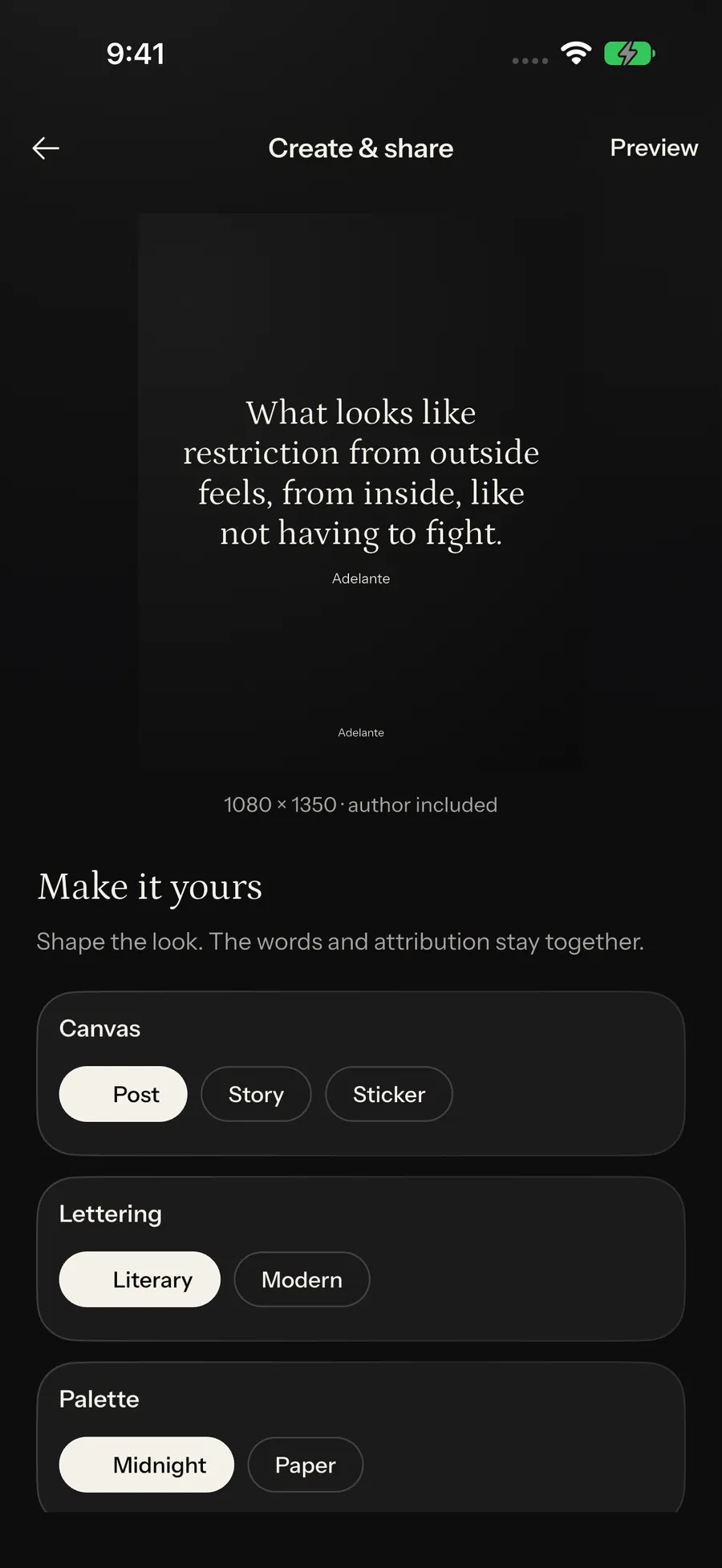
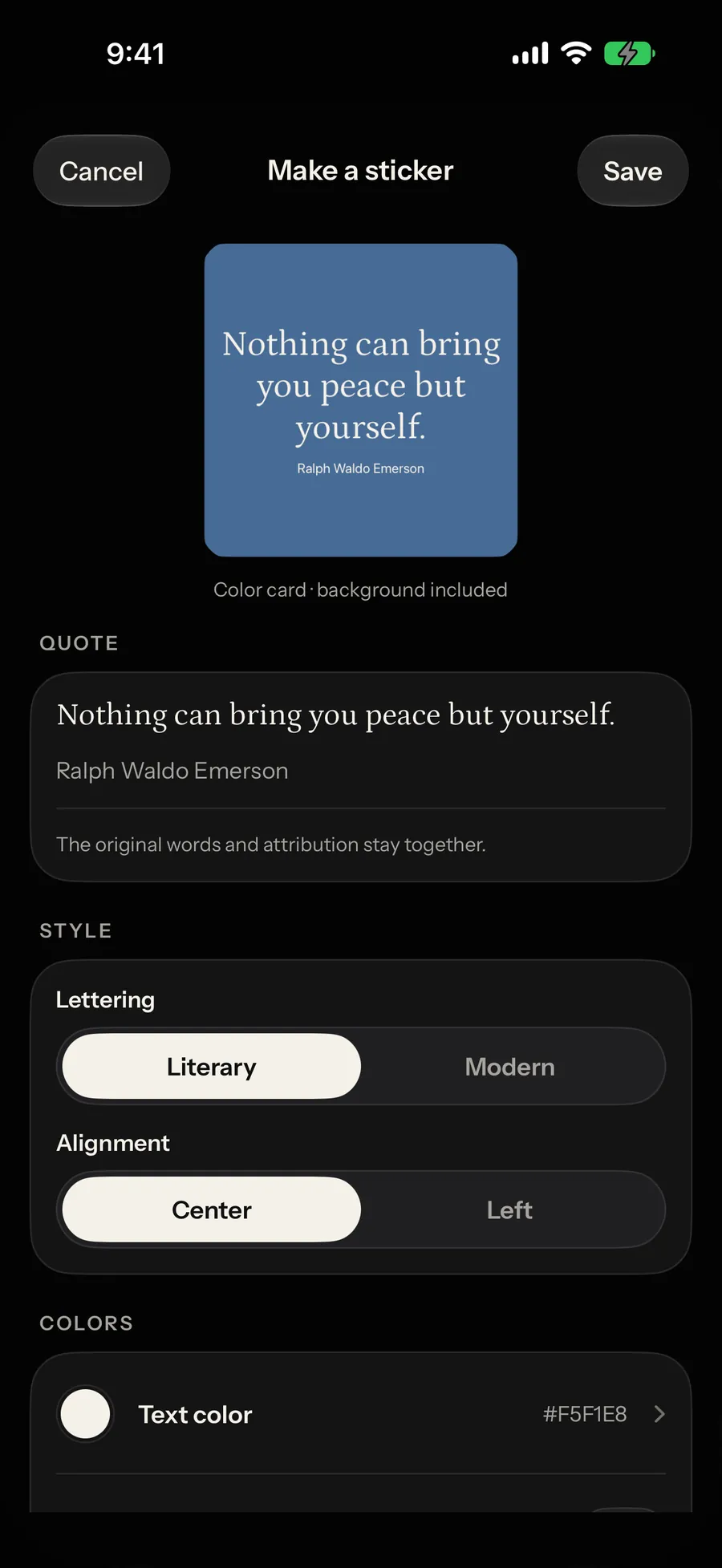
Between July and release the product grew an Apple Watch reader with complications, a Messages sticker extension, a share editor for post, story and transparent sticker artwork, iPad layouts, local reminders and per-widget saved designs. It went through TestFlight builds up to 1.0.0 (21), most with a written delivery note, before the App Store release on 4 October 2026.
Testing
The source on 12 October 2026 holds 77 Dart test files with 478 declarations, 115 of them widget tests, plus 105 backend declarations and 20 Watch XCTest methods. The 2 October TestFlight build passed 566 Flutter tests. Several Dart tests read the Swift, Kotlin and XML sources and check their text. A CI workflow is written but has not run on GitHub yet, so these checks ran locally.
- Dart test files
- 77
- Dart test declarations
- 478
- Widget test declarations
- 115
- Assertions
- 1,908
- Backend test declarations
- 105
- Watch XCTest methods
- 20
Representative cases
A user who picks one tradition is never shown another
Faith filtering is a hard predicate applied before any scoring, in two places that both switch exhaustively over the ReligiousPreference enum. The tests generate one case per faith asserting both a minimum count and that no other tradition appears, plus a case that Islam-only never surfaces another faith and one that secular categories never leak scripture when no faith has been chosen.
A Dart test that asserts on Swift
test/ios_widget_source_test.dart reads ios/AdelanteWidgets/AdelanteWidgetViews.swift and asserts the widget background is applied through one modifier outside the family switch. Moving it inside compiles perfectly and breaks the surfaces that require a container background, the exact class of bug a compiler cannot see.
A Dart test that asserts on Android XML
test/android_widget_remote_views_test.dart reads the widget layout and asserts it uses only tags RemoteViews supports, and that the quote image keeps its aspect ratio, stays visible to accessibility services and carries no text size or margin that would disturb the block drawn on the app side.
Content floors asserted against the shipped asset
test/content_asset_floor_test.dart and test/content_library_test.dart load the shipped library and assert per-category and per-faith minimums, and test/content_provenance_audit_test.dart checks the two quarantined false-original records cannot ship or regenerate, so a regenerated library that thins a category or readmits those lines fails a test run.
Results in detail
Live on the App Store
Adelante: Daily Quotes 1.0.0 was released on the App Store on 4 October 2026, free, for iOS 16 and later. The bundle carries five targets (the app, its widget extension, the Watch app, the Watch widgets and the Messages extension), each with its own privacy manifest, and passed Apple’s review.
Backend deployed behind App Check
Eight Cloud Functions, Firestore rules and indexes are deployed to adelante-yeegz with App Check enforcement, so the content endpoint refuses a request without a valid attestation token. Firestore denies every client write.
Seven widget families from one set of views
The iOS bundle declares systemSmall, systemMedium and systemLarge, systemExtraLarge on iPad only, plus accessoryInline, accessoryCircular and accessoryRectangular, and applies containerBackground(for: .widget) with a pre-iOS-17 fallback, which is what makes the same views legal in StandBy. There is no StandBy-specific code; the same views are StandBy-safe. On iOS 17 and later each placed widget can show a different saved design.
12,759 entries, no duplicate text
The shipped library holds 12,759 entries with 12,759 unique ids and 12,759 unique texts across 20 categories, and five traditions clearing the 500-per-category floor the pipeline was built to reach: islam 598, judaism 559, hinduism 558, christianity 558, buddhism 550.
No ads, no accounts, no third-party analytics
The 15 direct runtime dependencies include no analytics, auth, attribution, crash-reporting or advertising package, and Info.plist carries no tracking usage description. Usage counting is first-party, off by default and declared in the privacy manifest as not linked to identity and not used for tracking.
Reflection
What worked
- Auditing the codebase and writing the defects down before touching them. The overhaul spec’s “Baseline facts” section is what made the fixes checkable a month later.
- Treating deliberate replication as a contract instead of a synchronisation problem. One pure rotation function copied into three languages, with tests reading the copies off disk, beat any scheme where the processes had to tell each other anything.
- Keeping judgement in the generators and enforcement in a pure gate. A deterministic function can be read, tested and re-run over the whole library; a review pass cannot.
- Writing a delivery note for TestFlight builds. Each one records what changed, what was checked and what was not, which is why the open items below are known rather than guessed.
What I underestimated
- The asset. 11.8 MB of uncompressed JSON is decoded at boot. The spec called for gzip, gzip was never applied, and the cold-start cost still has not been measured, which means the decision has not actually been evaluated.
- What a gate cannot see. It caught duplicates and filler, but not repeated templates across categories, unsupported health claims or lines that were not original; those took a separate audit and a 69-record quarantine.
- What a source-text assertion buys. Reading Swift and XML from a Dart test catches deletion and reintroduction and says nothing about how either surface renders: useful, but not the coverage it can be mistaken for.
What I would do next
- Verify App Attest end to end on a physical iPhone and paired Watch, along with offline reading, Always On, complication placement and sticker insertion in the real Messages app, none of which a simulator proves.
- Take Android to Google Play: create the Play app record, set up release signing and Play Integrity, and run the required testing track.
- Finish the content provenance audit. The release preflight does not yet clear the bundled library on source and rights evidence, and the quarantine showed why that check matters more than the entry count.
- Get the CI workflow running on GitHub by landing it on the default branch, so the gates stop depending on a local run.
- Compress the library asset and move the parse off the main isolate, after measuring cold start, so the change has a number attached to it.
Stack and release record
Platforms
iOS 16+ (iPhone and iPad), watchOS (Apple Watch app and complications), iMessage (sticker extension), Android (built, not on Google Play)
Built with
Flutter 3.44.1, Dart 3.12.1, Riverpod 3, Swift / SwiftUI, WidgetKit, App Intents, watchOS / WatchConnectivity, Messages framework, Kotlin, Android RemoteViews, home_widget, TypeScript, Node.js 22, Firebase Cloud Functions (v2), Firestore, Firebase App Check, GitHub Actions
Testing and delivery
Source inventory checked on 12 October 2026: 478 Dart test declarations across 77 files (363 unit/contract and 115 widget declarations), 105 backend declarations (68 unit and 37 emulator/operations), and 20 authored Watch XCTest methods (11 core and 9 UI). The build 21 delivery note records 566 executed Flutter tests passing on 2 October; declaration counts and executed results are different measures. Adelante 1.0.0 was released on the App Store on 4 October 2026; Android publication is pending.
Status in full
Live on the App Store since 4 October 2026 as “Adelante: Daily Quotes”, version 1.0.0, free, for iOS 16 and later, with the Apple Watch app and the Messages extension shipped in the same bundle. The Firebase backend is deployed: eight Cloud Functions, Firestore and App Check enforcement on the adelante-yeegz project. Android shares the codebase and its debug build passes, but it is not on Google Play; the Play app record, release signing and Play Integrity setup are still open.
More work
- BupplesShared expenses, receipt review and settlement plans, backed by a multi-currency ledger.
- WayClubGroup management for teams, clubs and communities, from meetings to handover.
- PhotoshootA photobooth with 52 live effects, reactive face masks and prints you can design.
- CodeAtlasFinds the tests that reach a code change, runs both revisions and signs the evidence.
- PlanketA shared calendar that shows when everyone is free and sends a plan in three taps.
- CareerOSNotices when you ship, and drafts résumé and LinkedIn lines from evidence it can cite.
- HACKFAMTeammate matching for hackathons, CTFs and game jams, event by event.


