Sixteen Milliseconds: Frame-Budget Measurements of 53 WebGL 2 and Face-Tracking Camera Effects in a Browser Photobooth, and Three Rendering Defects
4×lower frame rate once face tracking switches on
- All 36 effects without face tracking held 60 fps headless at all three resolutions, and 119–120 fps in a partial windowed run at 120 Hz.
- One MediaPipe face-landmark call took a median 35.2 ms on the main thread at 1280×720, so the 17 face effects ran at 21–30 fps.
- At 1920×1080 the median effect’s isolated GPU draw took 0.26 ms; the one outlier, Flower Crown, took 6.5 ms.
- On a test frame, the pre-1.5.1 landmark mapping put 11% of Bug Out’s changed pixels near the eyes (0% mirrored); the shipped mapping puts 100%.
Limits. One Mac, one browser and a synthetic camera clip; Windows not measured; the 120 Hz windowed run is partial, so the full data set is headless.
Abstract
- The problem
- A camera effect has about 16.7 milliseconds per frame to stay smooth at 60 fps. Photoshoot ships 53 effects in the browser, 17 of which track faces, and their cost per frame had never been measured.
- What I did
- I built a harness around the app’s own renderer and face tracker, fed it a fake camera made from the product’s AI-generated sample photograph, and timed every frame, GPU draw and face-tracking call for all 53 effects at three resolutions, on one M1 Pro MacBook Pro in Chrome 156.
- What I found
- All 36 shader-only effects held the frame rate, and every shader except Flower Crown used a small fraction of the budget. All 17 face effects fell to 21–30 fps, because one face-tracking call took a median 35.2 ms on the main thread. In a partial windowed run at 120 Hz, face effects ran at a quarter of the shader-only rate. Of three earlier display defects, only one was platform-specific.
- Why it matters
- On this machine, main-thread inference, not shading, set the frame rate. The report recommends moving tracking off the main thread or running it less often; these are suggestions, not measured fixes. Windows was not measured.
Contributions
- A reproducible harness that times a shipped WebGL 2 camera product’s own renderer and MediaPipe tracker frame by frame, with a fake camera built from public sample media.
- Frame-interval, CPU, GPU-timer and isolated-draw measurements for all 53 Photoshoot effects at three resolutions, with every MediaPipe inference call timed (8,677 calls) and six tracker configurations compared.
- Root-cause accounts of three rendering defects (a canvas hint Chromium ignores on macOS, a CSS visibility race and a landmark coordinate flip), one re-measured and one partly re-checked.
- Practical guidance for real-time camera pages in the browser, offered as recommendations rather than measured fixes, including a benchmarking pitfall specific to tile-based Apple GPUs.
Keywords. WebGL2 · GLSL · frame budget · requestAnimationFrame · requestVideoFrameCallback · MediaPipe · face landmarks · Chrome · Apple M1 Pro · tile-based deferred rendering · Electron · performance measurement
1 Introduction
A camera effect has one job: keep up with the camera. At 60 frames per second that leaves about 16.7 ms to fetch a frame, change it and hand it to the browser, and Google's RAIL guidance asks pages to use only about 10 ms of that [1]. A photobooth that drops below that rate looks broken, even when every photo it saves is perfect.
Photoshoot is a photobooth for the browser and Windows that I designed and built. Release 1.5.1 (26 October 2026) ships 53 real-time effects: colour looks, distortions and 17 face effects (nine of them new in that release), driven by MediaPipe face landmarks that follow up to four people and react to expressions. All 53 run as WebGL 2 fragment shaders on one canvas.
Until this study, its performance had been judged by eye and by the app's own frames-per-second overlay, on the developer's Mac. Three defects had also made the product look broken: a black viewfinder on Windows, a black effects panel, and face masks that landed below the face. Each was found by someone using the app, not by a measurement, and only the first turned out to be specific to one platform.
This report asks three research questions and answers each with named experiments (Section 4.5):
- RQ1. Where does each effect's frame budget go? Live-loop timing (E1) and isolated GPU draws (E2); Sections 5.1, 5.2 and 5.5.
- RQ2. How much of the budget does face tracking take, and what does its cost depend on? Live versus frozen landmarks (E1) and a sweep of tracker configurations (E3); Sections 5.3 and 5.4.
- RQ3. What do three past defects teach about testing real-time camera pages on one machine? A check of the desynchronized hint (E4), a re-measurement of the landmark defect (E5) and the project's records; Sections 5.6 and 6.
Contributions
- A harness that wraps Photoshoot's shipped
GLRendererand face tracker without modifying them, drives them from a fake camera made from the product's own sample photograph, and records every frame interval, render call, GPU timer query and inference call (Section 4). - Measurements for all 53 effects at 640×480, 1280×720 and 1920×1080 on an Apple M1 Pro (Section 5). Shader cost stayed within the budget for every effect. Face tracking did not, on any face effect, because inference runs synchronously on the main thread.
- Root causes of three rendering defects, one re-measured here, with the regression tests that now guard them (Section 6).
- Guidance for anyone building real-time camera effects in a browser, including a GPU benchmarking pitfall on tile-based Apple GPUs (Section 7). The guidance is a set of recommendations; none of the proposed changes was implemented or measured here.
Unlike studies that time models or kernels in isolation (Section 2.3), this is a whole-frame case study of one shipped product. The measurements cover one Mac and one browser. Windows, where Photoshoot's desktop app ships, was not measured; statements about Windows come from project records and are labelled as such.
2 Background and related work
2.1 Frame budgets and the browser's two clocks
Google's RAIL guidance puts the ceiling for an animation frame at about 16 ms (1000 ms divided by 60 frames per second) and recommends that page work finish in about 10 ms, because the browser needs time of its own to produce the frame [1]. That guidance assumes a 60 Hz display. The laptop used here refreshes at 120 Hz, an interval of 8.3 ms. This report keeps 16.7 ms, the 60 fps budget, as its target and reports the display's own interval alongside it.
A camera page has two clocks. requestAnimationFrame fires once per display frame. requestVideoFrameCallback, a WICG draft, fires when a new video frame is presented for composition and reports metadata such as how many frames have been presented [2]. A 30 fps webcam on a 120 Hz display therefore gives four animation frames per camera frame, and a renderer driven by animation frames redraws each camera frame several times.
2.2 Face landmarks in real time
MediaPipe describes perception pipelines as graphs of reusable calculators, with performance measurement on the target device as a stated goal [3]. Its face pipeline starts with BlazeFace, a detector its authors report at sub-millisecond speeds on flagship phone GPUs [4], followed by a 468-vertex face mesh regressed from a single camera, reported at 100 to 1000+ frames per second on mobile GPUs depending on device and variant [5]. Attention Mesh refines eye and lip regions while staying real-time, at over 50 fps on a Pixel 2 [6]. The FaceLandmarker task that Photoshoot uses bundles a face detector, a face mesh with 478 landmarks and a blendshape model with 52 expression scores, and offers IMAGE, VIDEO and LIVE_STREAM running modes [7].
Those published speeds are for native code on phone GPUs, timed per model. A web page pays for WebAssembly, for a JavaScript boundary, and, in VIDEO mode, for a synchronous call on whichever thread makes it. The question for an application is not how fast the model is but what the call does to the frame.
2.3 Inference and graphics in the browser
Ma et al. surveyed seven JavaScript deep-learning frameworks and measured a substantial gap between in-browser and native inference [8]. Wang et al. extended this to nine models on 50 PCs and 20 mobile devices and reported, besides the latency gap, heavy memory use and GUI rendering slowed by 67.2% on average while inference runs [9]. That last effect is what this report measures, for one product. Jangda et al. measured WebAssembly at about 45% (Firefox) and 55% (Chrome) slower than native on SPEC CPU [10]. TensorFlow.js documents the design trade-offs of GPU-backed machine learning in the browser [11]. Sengupta et al. compared WebGL and WebGPU for general-purpose GPU work and found that, for small inputs, CPU–GPU synchronisation overhead makes both APIs slower than the CPU [12].
These studies time models or kernels in isolation. This report times one shipped product's whole frame, with its real shaders and its real tracker, on one machine, and separates the parts.
2.4 Measuring GPU work from a web page
EXT_disjoint_timer_query_webgl2 exposes GPU elapsed-time queries to WebGL 2, with a flag that marks results invalidated by a disjoint event [13]. Apple GPUs use tile-based deferred rendering: they process a render pass's geometry per tile and shade only visible primitives [14]. That matters for any benchmark that draws the same opaque full-screen quad many times, as Section 4.4 shows.
3 Photoshoot's rendering and tracking path
Photoshoot is a photobooth for Windows (Electron) and the browser, written in TypeScript. The live site is photoshoot-yeegz.web.app/app/; Windows release 1.5.1 shipped on 26 October 2026 (commit fcdb7bf). Everything runs locally: camera frames never leave the device.
3.1 Rendering path
The camera stream plays into a <video> element mounted at 1×1 pixel with zero opacity; pixels reach the screen only through one WebGL 2 canvas. Each frame, GLRenderer uploads the current video frame into one reusable texture (texImage2D with UNPACK_FLIP_Y_WEBGL) and draws one full-screen quad with the selected effect's fragment shader. Programs are compiled lazily on first use and cached. The canvas is created with preserveDrawingBuffer: true, antialias: true and powerPreference: 'high-performance', and, since 1.0.2, without desynchronized.
The loop is driven by requestAnimationFrame, not requestVideoFrameCallback. A comment in renderer.ts records why: on some browser, GPU and OS combinations rVFC did not fire for a hidden or 1-pixel video, and an rVFC-only loop then never ticked, so the camera looked broken.
3.2 The effect library
The registry (src/renderer/gl/effects.ts) holds 53 effects: the 26 of the Photo Booth set (Normal, 17 filters and distortions, 8 face effects) and 27 added in 1.5.1 (nine looks, nine fun effects, nine face effects including Doe Eyes). Seventeen effects are face-tracked. All 53 are single-pass fragment shaders in shaders.ts; 18 animate with a time uniform and 8 have a draggable centre. A shared header passes up to four faces as uniform arrays and runs face code once per person through an EACH_FACE loop.
3.3 Face tracking
faceTracker.ts loads MediaPipe's FaceLandmarker (tasks-vision 0.10.18) from the app's own origin the first time a face effect is chosen. It runs in VIDEO mode with up to four faces, blendshapes on, the CPU delegate (the default) and confidence thresholds of 0.6. Its own requestAnimationFrame loop calls detectForVideo whenever the video's currentTime has changed, that is, once per new camera frame, on the main thread. The tracker then merges duplicate faces, smooths landmarks adaptively, eases four expression scores (jaw open, brows raised, smile, blink) and predicts positions up to 110 ms ahead between detections.
4 Method
4.1 Machine and browser
All measurements were taken on 2 November 2026 on a 14-inch MacBook Pro (MacBookPro18,3) with an Apple M1 Pro (8-core CPU, 14-core GPU) and 16 GB of memory, running macOS 27.0.1 on mains power with Low Power Mode off. The browser was Google Chrome 156.0.8078.74, launched by Playwright 1.62.1. WebGL reported ANGLE (Apple, ANGLE Metal Renderer: Apple M1 Pro) in every run, so rendering used the real GPU through ANGLE's Metal backend, not a software rasteriser.
4.2 Two kinds of run
The plan was a windowed (headed) run on the built-in 120 Hz display, three repetitions per effect per resolution. That run was stopped after 81 of its 159 measurements at 640×480, because its windows kept interrupting other work on the machine. Run 0 had covered all 53 effects and run 1 had covered 28. The run had not yet written its raw file, so only its per-measurement summary lines survive (frame count, median and 99th-percentile interval, mean render time, mean inference time); they are parsed into a CSV in the artifact. Two shorter windowed probes at 1280×720 also survive: one with Normal and Bug Out plus MediaPipe variants, and one with the frame-rate limit removed for five effects.
The complete data set therefore comes from headless Chrome. Headless Chrome on this Mac still used the hardware GPU, but its frames are paced by an internal 60 Hz clock rather than the display. Every effect was measured twice for 3 s after a 1 s warm-up, in a different seeded random order each time, at each of the three resolutions: 318 live measurements. Each face effect was also measured once per resolution with landmarks frozen (51 measurements). Headless pacing hides frame rates above 60 fps but shows anything slower, which is the question here.
4.3 Fake camera and harness
The camera was Chrome's fake capture device (--use-fake-device-for-media-stream) reading a Y4M file (--use-file-for-fake-video-capture). Each file was built from Photoshoot's public sample photograph, an AI-generated portrait of two fictional adults, cover-cropped to the resolution, with a gentle seamless sway (1–3% zoom, under 1% pan) over a 30-frame, one-second loop at 30 fps. No personal footage was used. Both faces are detected in every run.
The harness imports Photoshoot's renderer, shaders, effect registry and face tracker from commit fcdb7bf and bundles them with esbuild. Two small modules stand in at the edges: a stub for the app's global state (the tracker reads only the video element from it), and a pass-through wrapper between the renderer and the tracker that can freeze landmarks or replay the pre-1.5.1 coordinate mapping. Otherwise nothing is changed: the shipped requestAnimationFrame loop renders, and the harness only observes it. The video element is mounted exactly as the app mounts it, at 1×1 pixel with zero opacity, and the canvas is shown at 960 CSS pixels wide.
4.4 What is recorded
- Frame interval. A second
requestAnimationFrameloop records every frame timestamp; the interval is the difference between consecutive timestamps. - Dropped frame. An interval longer than 25 ms (1.5 × 16.7 ms), meaning at least one 60 Hz frame was skipped. A bare “over 16.7 ms” test would count on-time frames, because timestamps at a 60 Hz clock read 16.7 or 16.8 ms after quantisation.
- CPU render time. The wall time of each
renderLiveFrame()call: the camera-frame upload and the draw submission, not the GPU's execution. - GPU time per frame. An
EXT_disjoint_timer_query_webgl2elapsed-time query around each live frame's upload and draw [13]; results flagged as disjoint are discarded. - Isolated draw cost. One upload, then 40 draws of the effect, closed by a 1-pixel
readPixelsthat forces completion; the median of five repetitions. On Apple GPUs this needs care. Opaque full-screen draws into one target are removed before shading by the tile-based renderer [14], so 40 opaque draws cost about one. The harness therefore blends each draw with a constant alpha, which forces every draw to be shaded, and also keeps the opaque figure to show the size of the artefact. - Inference time. Every call to
FaceLandmarker.detectForVideois timed by wrapping the method on the class prototype. The call is synchronous, so its wall time is time the main thread spends on nothing else. - Cold first frame. The time for the first frame after an effect is chosen for the first time in a session, including compiling and linking its shader.
- Video-frame callbacks. The rate at which
requestVideoFrameCallbackfires for the hidden 1×1 video.
4.5 Experiments
- E1, live loop. Every effect as the app runs it. Face effects are also run with tracking switched off and the two faces' landmarks frozen, which isolates the shader's share.
- E2, isolated draws. The blended and opaque draw costs and the upload cost described above, for every effect at every resolution.
- E3, tracker configurations. Six FaceLandmarker configurations, each created afresh and timed for 90 calls on new camera frames at 1280×720, with the first 5 calls discarded. Each configuration ran once, in a fixed order.
- E4, desynchronized hint. The context created with and without
desynchronized: true, recording the attribute the browser reports, lit pixels and frame pacing, headless and in a window. - E5, landmark mapping. Bug Out rendered on one frozen frame with the shipped and the pre-1.5.1 landmark mappings, mirrored and not, with the changed pixels compared against each face's eye midpoint.
4.6 Analysis and uncertainty
Percentiles use linear interpolation over all intervals or calls in a group. Frame rates are frames divided by elapsed time. For inference, a 95% interval for the median comes from 1,000 bootstrap resamples of the pooled calls; consecutive calls are correlated, so these intervals are optimistic. For frame rates, the report gives the largest difference between an effect's two runs. E3 ran once per configuration, so differences of a few milliseconds there are within plausible run-to-run variation. analyse.mjs in the artifact computes every figure from the raw files.
5 Results: shaders fit, face tracking does not
5.1 Shader-only effects hold the frame rate
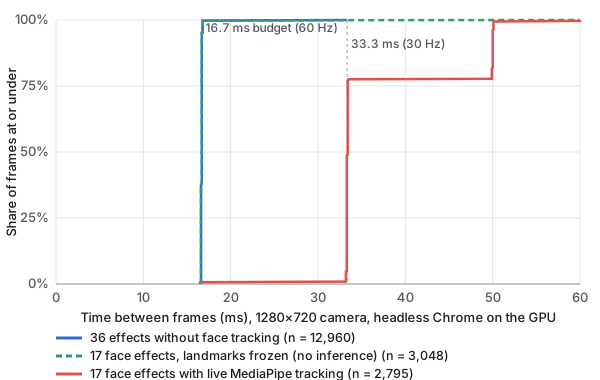
The 36 effects without face tracking ran at the frame clock at every resolution. Headless, they averaged 60.0, 60.0 and 59.9 fps at 640×480, 1280×720 and 1920×1080, with a 99th-percentile interval of 16.8, 16.8 and 16.8 ms and 1.2% dropped frames for the worst single effect (Table 1, Figure 1).
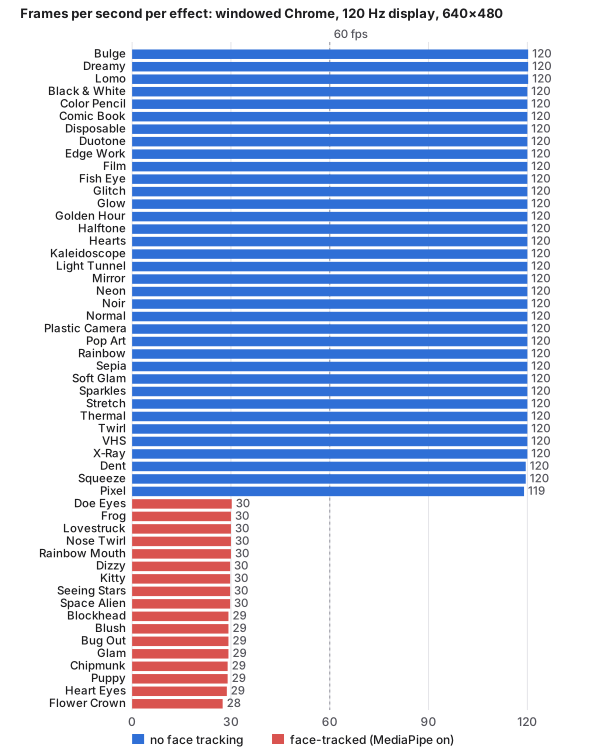
The partial windowed run shows the same at the display's own rate. At 640×480 on the 120 Hz screen, all 53 measurements of shader-only effects ran between 119 and 120 fps with a median interval of 8.3 ms, the display's refresh interval (Figure 2). The worst 99th percentile was 12.5 ms (Pixel).
| Resolution | Group | Effects | Frames | fps | p50 (ms) | p95 (ms) | p99 (ms) | Dropped |
|---|---|---|---|---|---|---|---|---|
| 640×480 | No face tracking | 36 | 12,964 | 60.0 | 16.7 | 16.8 | 16.8 | 0% |
| 640×480 | Face, live tracking | 17 | 3,062 | 29.6 | 33.3 | 50.0 | 50.1 | 95% |
| 640×480 | Face, frozen landmarks | 17 | 3,060 | – | 16.7 | 16.7 | 16.8 | 0% |
| 1280×720 | No face tracking | 36 | 12,960 | 60.0 | 16.7 | 16.7 | 16.8 | 0.0% |
| 1280×720 | Face, live tracking | 17 | 2,795 | 27.0 | 33.4 | 50.0 | 50.1 | 99% |
| 1280×720 | Face, frozen landmarks | 17 | 3,048 | – | 16.7 | 16.7 | 16.8 | 0.1% |
| 1920×1080 | No face tracking | 36 | 12,939 | 59.9 | 16.7 | 16.7 | 16.8 | 0.1% |
| 1920×1080 | Face, live tracking | 17 | 2,535 | 24.4 | 33.4 | 50.1 | 66.6 | 100% |
| 1920×1080 | Face, frozen landmarks | 17 | 3,064 | – | 16.7 | 16.7 | 16.8 | 0% |
Between an effect's two runs, frame rate differed by at most 0.33 fps for shader-only effects at 640×480 and 1280×720. At 1920×1080 the largest difference was Halftone's 5.7 fps, from a short burst of slow frames in one run; it is the 1.2% figure above.
Headroom is large. In the windowed probe with Chrome's frame-rate limit removed, Normal ran at 381 fps (median interval 2.6 ms) and Glow, Thermal and Light Tunnel at 207, 202 and 217 fps. That probe covered only five effects, so it is an indication, not a result.
5.2 Where a shader frame's time goes
The renderer's own work per frame is small (Table 2). The mean CPU time of one render call, which uploads the camera frame and submits the draw, had a median across effects of 0.27, 0.28 and 0.25 ms at the three resolutions. The camera-frame upload alone took about 0.41, 0.40 and 0.40 ms.
Isolated GPU draws were mostly cheap. At 1920×1080, half the effects cost under 0.26 ms per draw (Figure 3). One effect stands out: Flower Crown, whose shader evaluates nine flowers and eight falling petals for every tracked face at every pixel, with no early exit outside the crown, cost 6.5 ms per draw at 1920×1080 and 3.0 ms at 1280×720; the next most expensive, Hearts, cost 2.2 ms. The per-frame GPU timer, which also covers the upload, peaked at a median of 12.9 ms for Flower Crown at 1920×1080. That is 77% of the budget. It still fitted a 60 Hz frame, and with landmarks frozen Flower Crown dropped no frames, but it is the shader most likely to become the limit on a weaker GPU.
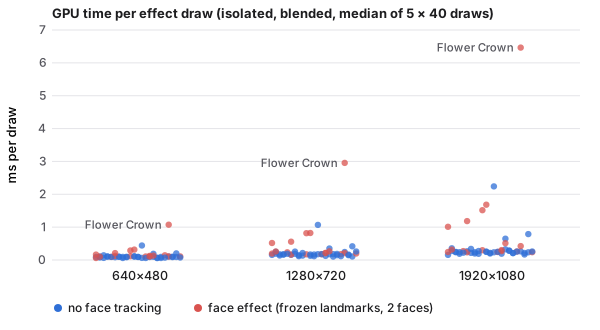
The opaque-draw figures show why the blending matters. Measured opaque, the median effect at 1920×1080 appeared to cost 0.08 ms, 3.3× less than with blending, because the GPU shaded only the last of the 40 overlapping quads.
First use costs more. The cold first frame of an effect, including compiling and linking its shader, had a median of 7.0 ms and a maximum of 66.4 ms across all effects and resolutions. That is one visible hitch when an effect is picked for the first time, not a sustained cost.
| Resolution | Render, median of effects (ms) | Upload (ms) | Draw, median / max (ms) | Draw, opaque median (ms) | GPU timer, max effect p50 (ms) | Inference p50 / p95 / p99 (ms) |
|---|---|---|---|---|---|---|
| 640×480 | 0.27 | 0.41 | 0.10 / 1.07 | 0.04 | 3.23 (Flower Crown) | 32.6 / 38.6 / 44.0 |
| 1280×720 | 0.28 | 0.40 | 0.18 / 2.96 | 0.06 | 9.66 (Flower Crown) | 35.2 / 44.8 / 52.7 |
| 1920×1080 | 0.25 | 0.40 | 0.26 / 6.46 | 0.08 | 12.94 (Flower Crown) | 39.5 / 48.9 / 56.2 |
5.3 Every face-tracked effect misses the budget
The 17 face effects behaved as one group. With live tracking they averaged 29.6, 27.0 and 24.4 fps at the three resolutions, with a median interval of 33.4 ms and a 99th percentile of 50.1 ms at 1280×720. Per effect, between 91% and 100% of frames were dropped against the 60 fps budget; the slowest, Flower Crown at 1920×1080, averaged 19.7 fps. Frame rate fell as resolution rose because inference grew slower (Section 5.4). Between an effect's two runs, face-effect frame rates differed by at most 2.9 fps.
In the windowed run the gap was wider, because the display allows 120 fps. Shader-only effects ran at a median of 120 fps and face effects at a median of 29.6 fps (27–31 across 28 measurements), a ratio of 4.05. This is the report's 4× headline; it comes from the partial run at 640×480 only. The worst windowed 99th percentile was 82.8 ms (Doe Eyes).
The shaders are not the cause. With tracking off and the two faces' landmarks frozen, the same 17 shaders ran at the frame clock: a median interval of 16.7 ms, a 99th percentile of 16.8 ms and 0.1% dropped frames at 1280×720 (Figure 1), and at most 1.2% for any single face effect at any resolution. Their isolated draws had a median cost of 0.30 ms at 1920×1080, against 0.24 ms for shader-only effects.
5.4 The cost of face tracking
One call to detectForVideo took a median of 32.6, 35.2 and 39.5 ms at the three resolutions (bootstrap 95% intervals 32.5–32.7, 35.0–35.3 and 39.3–39.6 ms), with a 99th percentile of 52.7 ms at 1280×720 and a maximum of 109.6 ms over 8,677 calls. The windowed run measured 31.9–37.8 ms per call (per-measurement means). Cost grew only modestly with camera resolution, about 21% from 640×480 to 1920×1080 for 6.75 times the pixels, which fits a pipeline that resizes frames to the models' small input sizes; the remaining growth is plausibly the larger frame's copy into the pipeline, which this study did not separate.
The call is synchronous and runs on the main thread inside the tracker's own animation-frame callback, once per new camera frame. A single call is already about twice the 16.7 ms budget, so the browser cannot produce a frame while it runs: the frame rate falls to about one frame per call. At 1280×720 the mean call took 36.3 ms, which allows 27.5 fps; the measured rate was 27.0 fps. The render call, by contrast, used about 0.29 ms of CPU time per frame (Figure 4A).
Long-task monitoring caught only the tail. The Long Tasks API reports work over 50 ms; it logged 11, 53 and 108 entries at the three resolutions, all during face effects and none during shader-only effects. A typical call of 33–40 ms stays under that threshold while still taking twice the frame budget, so a page watching only for long tasks would see a few warnings and miss that every frame was late.
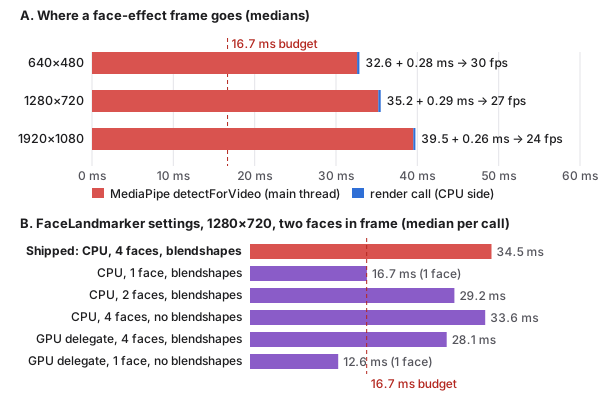
The configuration experiment (Table 3) shows what the cost depends on. With two faces in frame, the shipped configuration (CPU, up to four faces, blendshapes) took 34.5 ms. Limiting it to two faces saved 15% (29.2 ms); limiting it to one face roughly halved it (16.7 ms), because only one face was then processed. Cost followed the faces processed: here the second face added about 17.8 ms. Turning blendshapes off saved little (33.6 ms). The GPU delegate, with blendshapes on, saved about 19% (28.1 ms). The cheapest setting, GPU with one face and no blendshapes, took 12.6 ms, still most of a 60 Hz frame. Each configuration ran once, so only the large differences (one face against two) should be read as firm. None of the settings tested fits a 16.7 ms frame alongside rendering for two people while running on the main thread.
| Configuration | Faces returned | p50 (ms) | p95 (ms) | Create (ms) |
|---|---|---|---|---|
| Shipped: CPU, 4 faces, blendshapes | 2 | 34.5 | 41.1 | 1120 |
| CPU, 1 face, blendshapes | 1 | 16.7 | 18.7 | 308 |
| CPU, 2 faces, blendshapes | 2 | 29.2 | 33.8 | 521 |
| CPU, 4 faces, no blendshapes | 2 | 33.6 | 45.8 | 592 |
| GPU delegate, 4 faces, blendshapes | 2 | 28.1 | 32.9 | 616 |
| GPU delegate, 1 face, no blendshapes | 1 | 12.6 | 14.9 | 757 |
5.5 Two clocks, one renderer
requestVideoFrameCallback fired 30 times per second for the 1×1, zero-opacity video at every resolution, matching the 30 fps camera. The failure that led Photoshoot to drive its loop from animation frames instead did not reproduce on this Mac and Chrome version; the record does not say which platform showed it.
The cost of the animation-frame loop is redundant work. On the 120 Hz display the renderer ran about four times per camera frame, so, by arithmetic rather than direct measurement, about 75% of its uploads and draws repeated a frame already shown; headless at 60 Hz, about half did. Each redundant frame costs under half a millisecond of CPU here, so this is a waste of power rather than a frame-rate problem, but on a weaker machine it is not free.
5.6 The desynchronized hint on macOS
Requesting desynchronized: true on the Mac made no difference. In the window and headless alike, getContextAttributes() reported desynchronized: false whether or not the hint was requested; the preview was lit either way (185 of 256 sampled pixels without the hint and 185 with it in the window; 185 and 188 headless, where the moving clip differs between samples) and frame pacing was unchanged (120 and 120 fps in the window, 60 and 60 headless). This matches Chromium's source, which forces the attribute off on macOS [15], and it is exactly why the Windows defect in Section 6.1 never appeared on the developer's machine.
5.7 Per-effect results
Table 4 lists every effect at 1280×720. Within each group the effects are nearly indistinguishable at the frame-rate level; they differ in GPU cost, which never decided the frame rate on this machine.
| Effect | fps | p99 (ms) | Dropped | GPU (ms) | Draw 1080p (ms) | Inference (ms) |
|---|---|---|---|---|---|---|
| Halftone | 60.0 | 16.8 | 0% | 0.94 | 0.26 | – |
| Pixel | 60.0 | 16.8 | 0% | 2.81 | 0.25 | – |
| Plastic Camera | 60.0 | 16.8 | 0% | 0.85 | 0.27 | – |
| Bulge | 60.0 | 16.8 | 0% | 0.24 | 0.20 | – |
| Comic Book | 60.0 | 16.8 | 0% | 1.23 | 0.26 | – |
| Disposable | 60.0 | 16.8 | 0% | 0.37 | 0.35 | – |
| Dreamy | 60.0 | 16.8 | 0% | 1.78 | 0.34 | – |
| Fish Eye | 60.0 | 16.8 | 0% | 0.25 | 0.19 | – |
| Glow | 60.0 | 16.8 | 0% | 1.96 | 0.65 | – |
| Kaleidoscope | 60.0 | 16.8 | 0% | 1.06 | 0.22 | – |
| Lomo | 60.0 | 16.8 | 0% | 1.01 | 0.24 | – |
| Sepia | 60.0 | 16.8 | 0% | 1.18 | 0.15 | – |
| Sparkles | 60.0 | 16.8 | 0% | 2.65 | 0.79 | – |
| Squeeze | 60.0 | 16.8 | 0% | 0.63 | 0.20 | – |
| Thermal | 60.0 | 16.8 | 0% | 0.24 | 0.22 | – |
| Twirl | 60.0 | 16.8 | 0% | 2.97 | 0.28 | – |
| VHS | 60.0 | 16.8 | 0% | 0.52 | 0.24 | – |
| Dent | 60.0 | 16.8 | 0% | 1.36 | 0.24 | – |
| Edge Work | 60.0 | 16.8 | 0% | 3.02 | 0.26 | – |
| Film | 60.0 | 16.8 | 0% | 0.96 | 0.26 | – |
| Light Tunnel | 60.0 | 16.8 | 0% | 0.29 | 0.23 | – |
| Mirror | 60.0 | 16.8 | 0% | 0.42 | 0.23 | – |
| Noir | 60.0 | 16.8 | 0% | 1.49 | 0.22 | – |
| Normal | 60.0 | 16.8 | 0% | 0.22 | 0.25 | – |
| Pop Art | 60.0 | 16.8 | 0% | 1.36 | 0.19 | – |
| Soft Glam | 60.0 | 16.8 | 0% | 1.15 | 0.33 | – |
| Stretch | 60.0 | 16.8 | 0% | 1.61 | 0.21 | – |
| X‑Ray | 60.0 | 16.8 | 0% | 1.15 | 0.17 | – |
| Black & White | 60.0 | 16.8 | 0% | 0.25 | 0.19 | – |
| Glitch | 60.0 | 16.8 | 0% | 0.24 | 0.21 | – |
| Golden Hour | 60.0 | 16.8 | 0% | 1.92 | 0.21 | – |
| Hearts | 60.0 | 16.8 | 0% | 2.41 | 2.24 | – |
| Neon | 60.0 | 16.8 | 0% | 0.28 | 0.28 | – |
| Rainbow | 60.0 | 16.8 | 0% | 0.93 | 0.24 | – |
| Duotone | 60.0 | 16.8 | 0% | 0.71 | 0.28 | – |
| Color Pencil | 59.8 | 16.8 | 0.3% | 1.66 | 0.28 | – |
| Frog ● | 29.6 | 50.1 | 96% | 0.25 | 0.27 | 32.7 |
| Space Alien ● | 28.3 | 50.0 | 98% | 0.57 | 0.23 | 33.9 |
| Chipmunk ● | 28.0 | 50.0 | 99% | 0.64 | 0.24 | 33.9 |
| Kitty ● | 27.8 | 50.1 | 99% | 1.35 | 1.01 | 34.5 |
| Blockhead ● | 27.7 | 50.1 | 100% | 0.30 | 0.30 | 34.5 |
| Doe Eyes ● | 27.7 | 50.1 | 99% | 0.77 | 0.42 | 34.6 |
| Lovestruck ● | 27.6 | 50.1 | 100% | 0.32 | 0.27 | 34.5 |
| Dizzy ● | 27.5 | 50.1 | 98% | 0.24 | 0.26 | 34.6 |
| Blush ● | 27.5 | 50.1 | 100% | 0.49 | 0.32 | 35.1 |
| Bug Out ● | 27.4 | 50.1 | 99% | 0.24 | 0.24 | 35.1 |
| Glam ● | 27.2 | 50.0 | 100% | 0.77 | 0.51 | 35.9 |
| Heart Eyes ● | 27.2 | 50.1 | 100% | 2.13 | 1.18 | 35.6 |
| Rainbow Mouth ● | 26.9 | 50.1 | 100% | 0.68 | 0.30 | 35.8 |
| Nose Twirl ● | 26.7 | 56.4 | 99% | 0.74 | 0.24 | 34.3 |
| Seeing Stars ● | 25.2 | 50.1 | 100% | 2.28 | 1.68 | 38.5 |
| Puppy ● | 25.0 | 58.4 | 100% | 2.88 | 1.51 | 37.7 |
| Flower Crown ● | 21.2 | 66.7 | 100% | 9.66 | 6.46 | 46.3 |
6 Three rendering defects and their root causes
The measurements explain why the face effects are slow. They do not explain the three defects that made Photoshoot look broken. Only the first is specific to a platform: it could not appear on the developer's Mac. The second is a style-timing race found in everyday use, and the third is a coordinate error that appears on any platform. All three are summarised from the project's commits, tests and records. The third was re-measured for this report, and the macOS half of the first was re-checked.
6.1 The black viewfinder on Windows (fixed in 1.0.2)
Symptom. According to the project's records, on Windows PCs with a working GPU the app said the camera was live, but the preview, every effect thumbnail and every saved photo were black. On the developer's Mac everything worked.
Root cause. The WebGL context was created with desynchronized: true, a hint that asks Chromium for its low-latency canvas path [16]. Chromium forces the attribute to false on macOS; its source carries #if BUILDFLAG(IS_MAC) … result.desynchronized = false with a TODO pointing at crbug.com/945835 [15]. On Windows it is honoured. According to commit c2a7333, on the Direct3D 11 backend with GPU compositing that path presented a black drawing buffer even though the context, shaders and video upload all succeeded. The commit records the reproduction on a GitHub Windows runner (Edge, ANGLE Direct3D 11 on the WARP software adapter, --ignore-gpu-blocklist): 0 of 256 sampled pixels lit with the hint, 256 of 256 with only that line removed. WARP is a software rasteriser, so the claim that hardware GPUs fail the same way rests on the project's records, not on a measurement.
What this study re-checked. On the Mac, Chrome 156 reported desynchronized: false from getContextAttributes() whether or not the hint was requested, and rendered the same lit pixels and the same frame pacing either way (Section 5.6). The Mac could not have shown the defect. The Windows half was not re-measured.
Guard. viewfinder.spec.ts reads real pixels back from the preview, an effect and a saved capture, and a win-d3d11 Playwright project forces the Direct3D 11 and GPU-compositing path on Windows CI. The release workflow is gated on it.
6.2 The black effects grid (fixed in 1.4.0)
Symptom. In the desktop app, after using an effect, taking a photo, viewing it and going back, opening Effects turned the camera black until the app was restarted. It was found in use, not by a test.
Root cause. Per commit 9f34b37 and the handoff record, the effects grid inherited visibility from its panel. The grid's zoom animation starts in the same frame the panel opens, and Chromium restyled it from its cached pre-animation style, so an open, opaque panel covered the camera while the grid inside it stayed hidden. Nothing was wrong with the camera or with WebGL. The fix gives the grid its own visibility rule for each panel state. The Electron regression test, which repeats effect, photo, review and back four times and asserts the grid is visible each time, is recorded as failing without the fix.
Lesson. “The camera went black” had three different causes in this product's history: a graphics path that presented black, a panel that covered the camera, and, during 1.4.0, a video review that used an <img>. Pixel-reading tests catch the first. The second needed a test of the whole interaction sequence.
6.3 Face masks below the face (fixed in 1.5.1)
Symptom. Before 1.5.1, face effects warped the chin or the area below the face, and, with the mirrored preview, the wrong side of the frame.
Root cause. MediaPipe returns landmarks in image coordinates, with y pointing down. The video texture is uploaded with UNPACK_FLIP_Y_WEBGL, so shaders sample with y pointing up, and the shader header already un-mirrors coordinates before running an effect. The 1.4.0 renderer uploaded landmarks with y unchanged and mirrored x itself, so y was wrong in every frame and x was mirrored twice when the preview was mirrored. Release 1.5.1 uploads (x, 1 − y) and never touches x (commit fcdb7bf), guarded by face.spec.ts, which uses the sample portrait as a fake camera and checks that Bug Out's changed pixels sit around the eyes.
Re-measured here. The harness rendered Bug Out on one frozen camera frame with the two detected faces' landmarks, once with the shipped mapping and once with the old one, and compared changed pixels with each face's true eye midpoint (Figure 5). With the shipped mapping, 100% of changed pixels lay within 1.5 face-scales of an eye midpoint, mirrored or not. With the old mapping, 11% did unmirrored and 0% mirrored. The changed pixels' centre sat at 0.65 of the frame height instead of near 0.33: the warp landed reflected about the middle of the frame, below both faces.
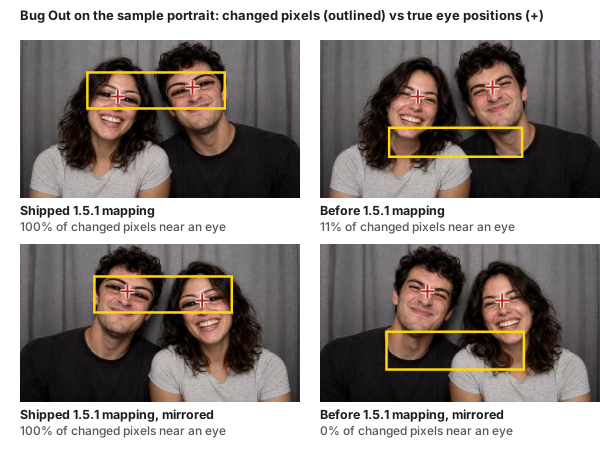
Why the Mac did not catch it. It could have, had anyone checked closely with a face in frame; the defect was not platform-specific in the way the first two were. It survived because the effects were judged on a moving, live face, where a warp “near the face” looks plausible, and because no test compared the warp's position with the landmarks. The fix's test compares exactly that.
7 Guidance for real-time camera pages
This section turns the measurements into recommendations. None of the changes proposed here was implemented or measured in this study, and each should be measured on the weakest machine a product supports.
7.1 Budget inference first, not shaders
On this machine the shaders were not the constraint. The median effect used 0.26 ms of GPU time per 1080p draw and the render call under half a millisecond of CPU; only Flower Crown, at 6.5 ms per 1080p draw, approached a meaningful share of the budget. Face-landmark inference took a median 35.2 ms per call at 1280×720, roughly twice the frame budget by itself. For a camera product, a performance review that profiles shaders and skips inference measures the wrong thing. Once inference leaves the main thread, the heaviest shader at the largest resolution becomes the next thing to watch; for Flower Crown, skipping the flower loop for pixels outside each face's crown region is the obvious first change.
7.2 Keep inference off the main thread
A synchronous call that takes longer than a frame sets the frame rate for everything else on the page, including the parts that do not need it. If inference ran in a worker, the face effects should render at the display rate with landmarks a frame or two behind, which the tracker's velocity prediction (up to 110 ms ahead) was written to cover. That expectation is untested: the worker must receive each camera frame (for example as an ImageBitmap or VideoFrame), and it still competes for CPU cores, so the gain will be smaller on machines with fewer of them. Photoshoot already runs its person-segmentation model in a worker (personSegmentation.worker.ts); the face tracker is the exception. Moving it is the clearest change this study points to, and it has not been made.
7.3 Choose tracking settings by faces in frame
In the configuration sweep, cost followed the number of faces processed far more than blendshapes or the delegate. An app that tracks up to four people pays for each person found. Options worth measuring per product are to track one face when only one is expected, to detect every second camera frame and predict in between (which halves the number of calls, though each call still blocks a frame while it stays on the main thread), or to lower the camera rate fed to the tracker. Each trades accuracy or latency for frame time, and each should be measured on the weakest target machine, not the developer's.
7.4 Drive the loop by both clocks
Rendering on every animation frame is robust, which is why Photoshoot does it. It is also wasteful when the display is faster than the camera. A loop can keep animation frames as the heartbeat and skip the upload and draw when requestVideoFrameCallback reports no new frame and the effect is not animated. If video-frame callbacks stop arriving, the loop still runs, so the failure the renderer's comment guards against cannot return.
7.5 Benchmark GPUs the way they render
Drawing the same opaque quad many times and dividing by the count is a common way to time a shader. On a tile-based GPU with hidden-surface removal it measures one draw, not many: here the opaque method under-reported the median effect by 3.3× at 1080p. Blending each draw, timing per frame with timer queries, or varying the target forces the work to happen.
7.6 Treat “works on my machine” as a platform claim
One of the three defects was invisible on macOS by construction, because Chromium ignores the desynchronized hint there. The coordinate defect was visible on any platform, but only to a check of where the warp landed rather than whether it appeared. The first was found on other people's machines and the third while building new face effects; both are now guarded by tests that read pixels. For camera pages, tests should read pixels back from the canvas and from saved captures (a context that “works” can present black), and a CI job should force the graphics backend the users have, as Photoshoot's win-d3d11 project does.
8 Threats to validity
8.1 Construct validity
Frame intervals come from requestAnimationFrame timestamps, which say when the browser started a frame, not when pixels reached the screen. Display latency, compositor queuing and tearing are not measured. The dropped-frame rule (over 25 ms) counts skipped 60 Hz frames, not the user's perception of smoothness.
CPU render time excludes GPU execution; GPU timer queries include the camera-frame upload; isolated draws exclude the upload and use blending, which adds a little work of its own. Each answers a different question, and none alone is “the cost of an effect”. The ranking of effects by isolated draw cost was noisy at the smallest sizes, where every draw took a fraction of a millisecond.
Headless and windowed Chrome pace frames differently. The full data set is headless, so it shows whether an effect keeps up with 60 Hz but not how far above 60 Hz it could run; the windowed figures come from a partial run at one resolution.
8.2 Internal validity
The harness replaces the app's global state with a stub and inserts a pass-through wrapper between renderer and tracker. Both are small and read-only in normal use, but they are not the shipped bundle. The effects browser's thumbnail renderer, the backgrounds compositor and the rest of the app's UI were not running, so the real app does more work per frame than measured here.
Timing the inference call by wrapping it adds two performance.now() calls per frame, which is negligible next to tens of milliseconds. Effect order was randomised per run to spread thermal and caching effects, and the machine stayed on mains power, but thermal state was not logged. The tracker configurations, by contrast, ran once each in a fixed order, so drift during that sweep would bias their comparison. Finally, I built both the product and the harness; the raw data and scripts are published so that others can check the analysis.
8.3 Conclusion validity
Each effect has two 3 s runs per resolution, and each tracker configuration one run of 85 timed calls. Bootstrap intervals for inference treat calls as independent, which they are not, so they understate uncertainty. The large effects reported here (a frame rate halved or worse, inference twice the budget) are far outside the run-to-run differences observed; small differences between individual effects are not.
8.4 External validity
One machine, one operating system, one browser version. The M1 Pro has a strong GPU and a fast CPU; on a typical Windows laptop with integrated graphics, both shader and inference costs are likely higher, and the relative cost of inference and shading may differ. Windows was not measured. The camera input was a looping sample photograph with two faces and gentle motion; real webcams add noise, auto-exposure, motion blur and different numbers of faces, and tracking cost depends on how many faces are found.
9 Limitations
- Windows was not measured. Photoshoot's desktop app ships for Windows, and the black-viewfinder account relies on a commit message and the project's CI records, not on a measurement made for this report.
- The windowed run is partial. It covers 640×480 only, 81 of 159 planned measurements, and survives as summary lines rather than raw frames. The full data set is headless, where frame pacing is set by a 60 Hz internal clock, not the display.
- The desktop build was not measured. Electron 44 bundles its own Chromium; its numbers may differ from Chrome 156.
- Not all of the app was running. The effects-browser thumbnails, person-segmentation backgrounds, capture and recording paths were not measured.
- No real camera, no real people. The input was a synthetic clip of an AI-generated photograph, always with the same two faces.
- Few repetitions. Two runs per effect and resolution, and one run per tracker configuration.
- No fix was evaluated. Moving inference to a worker, and rVFC-gated rendering, are recommendations, not measured changes.
- Not peer reviewed. This is a technical report.
10 Conclusion
On one Apple M1 Pro in Chrome 156, Photoshoot's 53 effects fell into two clear groups. The 36 shader-only effects held the frame clock at every resolution tested, and, Flower Crown aside, their GPU cost was a small fraction of the budget. The 17 face effects ran at 21–30 frames per second, because one synchronous face-landmark call took a median 35.2 ms on the main thread at 1280×720; with landmarks frozen, the same shaders met the budget. In a single sweep, the cost followed the number of faces processed far more than blendshapes or the delegate.
The three defects that made the product look broken had little to do with speed, and only one was platform-specific: a canvas hint Chromium ignores on macOS and honours on Windows. The others were a visibility rule inherited during an animation and landmarks uploaded in the wrong coordinate frame. Tests that read real pixels now guard the first and the third, an interaction test guards the second, and the third was re-measured here.
The next step for Photoshoot is to move face tracking off the main thread, or run it less often, and to measure the result again, this time also on Windows hardware.
Artifact
The artifact at /research/frame-budget/artifact/ contains the harness (bench.ts, the stub and wrapper modules, and the build, clip, run, analysis, parsing and figure scripts), the raw headless results for all three resolutions (per-frame timestamps, render and GPU times, every inference call, isolated draws, the landmark case study and the desynchronized check), the per-effect CSV and summary JSON, and the partial windowed run with its probe subsets. Its README lists the machine, browser and package versions, the date, the exact commands and what was not measured. The fake-camera clips are rebuilt from Photoshoot's public sample photograph by make-y4m.mjs. Photoshoot's source is public at github.com/yeegz/photoshoot; the harness was run against commit fcdb7bf.
References
- Google. Measure performance with the RAIL model. web.dev. web.dev/articles/rail
- WICG. HTMLVideoElement.requestVideoFrameCallback(). Draft Community Group Report. wicg.github.io/video-rvfc
- C. Lugaresi, J. Tang, H. Nash, C. McClanahan, E. Uboweja, M. Hays, F. Zhang, C.-L. Chang, M. G. Yong, J. Lee, W.-T. Chang, W. Hua, M. Georg and M. Grundmann. MediaPipe: A framework for building perception pipelines. arXiv:1906.08172, 2019. doi.org/10.48550/arXiv.1906.08172
- V. Bazarevsky, Y. Kartynnik, A. Vakunov, K. Raveendran and M. Grundmann. BlazeFace: Sub-millisecond neural face detection on mobile GPUs. arXiv:1907.05047, 2019. doi.org/10.48550/arXiv.1907.05047
- Y. Kartynnik, A. Ablavatski, I. Grishchenko and M. Grundmann. Real-time facial surface geometry from monocular video on mobile GPUs. CVPR Workshop on Computer Vision for Augmented and Virtual Reality, 2019. arXiv:1907.06724. doi.org/10.48550/arXiv.1907.06724
- I. Grishchenko, A. Ablavatski, Y. Kartynnik, K. Raveendran and M. Grundmann. Attention Mesh: High-fidelity face mesh prediction in real-time. arXiv:2006.10962, 2020. doi.org/10.48550/arXiv.2006.10962
- Google AI Edge. Face landmark detection guide (MediaPipe Tasks FaceLandmarker). Google for Developers. developers.google.com/edge/mediapipe/solutions/vision/face_landmarker
- Y. Ma, D. Xiang, S. Zheng, D. Tian and X. Liu. Moving deep learning into web browser: How far can we go? In Proceedings of The Web Conference (WWW '19), pp. 1234–1244, 2019. doi.org/10.1145/3308558.3313639
- Q. Wang, S. Jiang, Z. Chen, X. Cao, Y. Li, A. Li, Y. Ma, T. Cao and X. Liu. Anatomizing deep learning inference in web browsers. ACM Transactions on Software Engineering and Methodology (accepted); arXiv:2402.05981, 2024. doi.org/10.48550/arXiv.2402.05981
- A. Jangda, B. Powers, E. D. Berger and A. Guha. Not so fast: Analyzing the performance of WebAssembly vs. native code. In 2019 USENIX Annual Technical Conference (USENIX ATC '19), pp. 107–120, 2019. usenix.org/conference/atc19/presentation/jangda
- D. Smilkov, N. Thorat, Y. Assogba et al. TensorFlow.js: Machine learning for the web and beyond. In Proceedings of the 2nd SysML Conference, 2019. arXiv:1901.05350. doi.org/10.48550/arXiv.1901.05350
- S. Sengupta, N. Wu, M. Varvello, K. Jana, S. Chen and B. Han. From WebGL to WebGPU: A reality check of browser-based GPU acceleration. In Proceedings of the 2025 ACM Internet Measurement Conference (IMC '25), 2025. doi.org/10.1145/3730567.3764504
- Khronos WebGL Working Group. WebGL EXT_disjoint_timer_query_webgl2 extension specification. registry.khronos.org/webgl/extensions/EXT_disjoint_timer_query_webgl2
- Apple. Tailor your apps for Apple GPUs and tile-based deferred rendering. Metal documentation. developer.apple.com/documentation/metal/tailor-your-apps-for-apple-gpus-and-tile-based-deferred-rendering
- Chromium project. canvas_context_creation_attributes_helpers.cc (Blink), main branch, read 2 November 2026: desynchronized forced to false under BUILDFLAG(IS_MAC), crbug.com/945835. chromium.googlesource.com/chromium/src/+/main/third_party/blink/renderer/modules/canvas/htmlcanvas/canvas_context_creation_attributes_helpers.cc
- J. Medley. Low-latency rendering with the desynchronized hint. Chrome for Developers blog. developer.chrome.com/blog/desynchronized
Cite and reuse
Authorship and AI assistance. Yousof Selim designed and built Photoshoot and directed this study; much of the implementation and parts of this report were produced with AI coding assistants (Claude, Codex) under his direction and review; measurements are reproducible from the artifact.
@techreport{selim2026frame,
  author      = {Yousof Selim},
  title       = {Sixteen Milliseconds: Frame-Budget Measurements of 53 WebGL 2 and Face-Tracking Camera Effects in a Browser Photobooth, and Three Rendering Defects},
  institution = {Sunway University (Lancaster University dual degree), Malaysia},
  type        = {Technical report},
  number      = {v1.0},
  year        = {2026},
  url         = {https://yousofselim.com/research/frame-budget/}
}


